Situated Brushing and Linking in Virtual and Augmented Reality
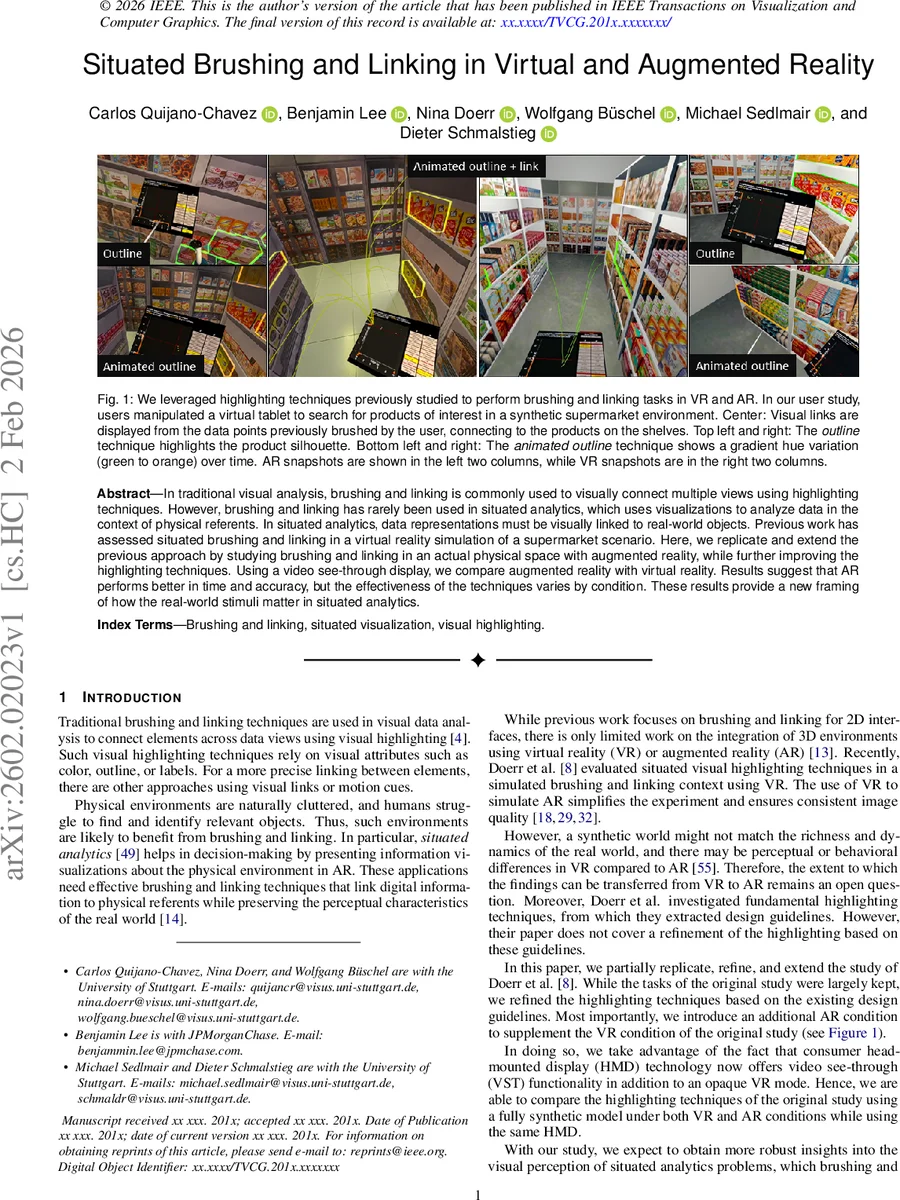
In traditional visual analysis, brushing and linking is commonly used to visually connect multiple views using highlighting techniques. However, brushing and linking has rarely been used in situated analytics, which uses visualizations to analyze data in the context of physical referents. In situated analytics, data representations must be visually linked to real-world objects. Previous work has assessed situated brushing and linking in a virtual reality simulation of a supermarket scenario. Here, we replicate and extend the previous approach by studying brushing and linking in an actual physical space with augmented reality, while further improving the highlighting techniques. Using a video see-through display, we compare augmented reality with virtual reality. Results suggest that AR performs better in time and accuracy, but the effectiveness of the techniques varies by condition. These results provide a new framing of how the real-world stimuli matter in situated analytics.
💡 Research Summary
This paper investigates brushing and linking—a core visual analysis technique—in the context of situated analytics, where digital visualizations must be linked to physical objects. Building on prior work that evaluated highlighting techniques in a purely virtual supermarket, the authors replicate the scenario in a real‑world mock‑up and compare it with a virtual‑reality (VR) version using the same video‑see‑through (VST) head‑mounted display (HMD).
Dataset creation began with scraping metadata and high‑resolution images for over 500 supermarket products; 263 box‑shaped items were selected, modeled as textured boxes in Blender, and arranged on 15 physical shelves. To keep the visual appearance identical across AR and VR, the front faces of the shelves were covered with high‑resolution printed posters rather than real product packaging.
The user interface consists of a virtual tablet held in the hand that displays a 2‑D scatterplot. Users can map any two product attributes to the axes, filter via sliders, and brush data points either by tapping individually or by dragging a rubber‑band rectangle. Brushed points are highlighted on the physical shelves using three refined techniques derived from earlier findings:
- Fat Outline (O) – a thick green contour around the product silhouette, leaving the interior visible.
- Animated Outline (A) – the contour continuously cycles between green and orange, providing temporal contrast to avoid background‑color clashes.
- Animated Outline + Linking (L) – the animated outline plus curved visual links that connect the scatterplot points to their real‑world referents, with partial link segments indicating off‑screen items.
The study recruited 40 participants (N=40) who performed three task types in both AR and VR: (i) Single Selection – locate a single product meeting a nutritional condition; (ii) Multiple Selections – find all products satisfying a range condition; (iii) Spatial Judgment – judge the left/right and top/middle/bottom placement of highlighted items on the shelves (no mental rotation required). Each task was executed under all three highlighting conditions, yielding a fully crossed design.
Performance metrics included task completion time, accuracy, and post‑experiment subjective ratings. Results show a clear advantage for AR: participants were faster and more accurate across all tasks, with the most pronounced benefit in the spatial‑judgment task where the unrestricted field of view of AR reduced the need for head‑turning. Regarding highlighting techniques, L (outline + link) excelled at guiding users to off‑screen items but introduced higher visual clutter, leading some users to report increased cognitive load. O offered the lowest visual complexity but suffered when product colors matched the green outline, reducing detectability. A provided a good balance of contrast and minimal clutter, though the continuous color change required users to synchronize attention across multiple highlighted items.
The authors draw two key implications. First, while VR simulations can approximate AR performance, the physical realism and unrestricted view of AR yield measurable gains in speed and accuracy, suggesting that findings from purely virtual studies should be validated in real‑world settings. Second, the design of highlighting cues must balance contrast, temporal dynamics, and spatial linking; no single technique dominates across all situations.
Limitations include the use of printed posters rather than actual product boxes, which reduces depth cues; the relatively modest participant pool; and hardware constraints such as HMD resolution and field‑of‑view that may have influenced results. Future work is proposed to incorporate real products, varied lighting conditions, and adaptive highlighting algorithms that tailor visual cues to user workload and environmental context.
Overall, the paper contributes a rigorous AR‑VR comparative study, introduces refined highlighting methods grounded in prior design guidelines, and provides empirical evidence on how situated brushing and linking can be effectively realized in physical environments.
Comments & Academic Discussion
Loading comments...
Leave a Comment