HIDAgent: A Toolkit Enabling "Personal Agents" on HID-Compatible Devices
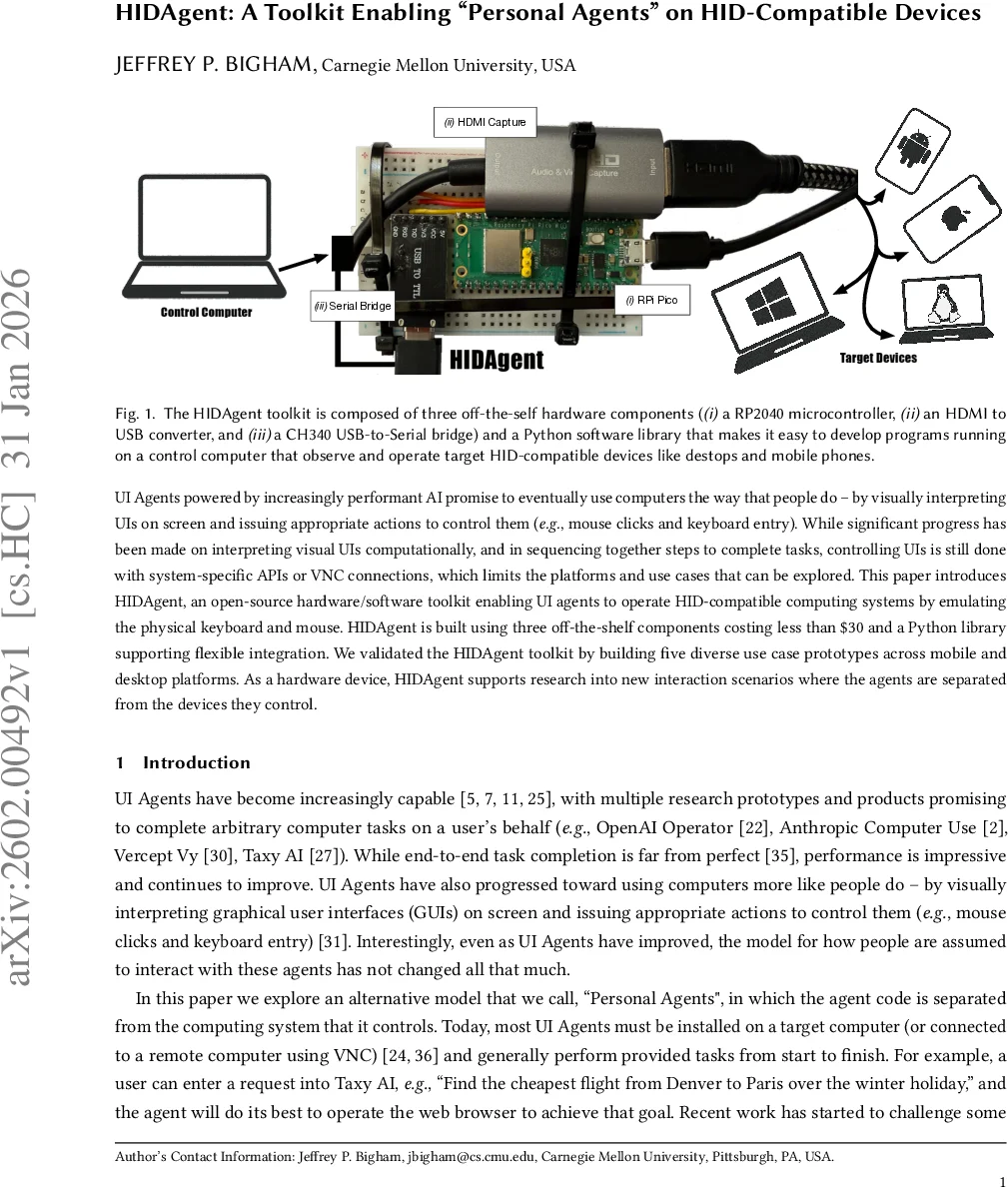
UI Agents powered by increasingly performant AI promise to eventually use computers the way that people do - by visually interpreting UIs on screen and issuing appropriate actions to control them (e.g., mouse clicks and keyboard entry). While significant progress has been made on interpreting visual UIs computationally, and in sequencing together steps to complete tasks, controlling UIs is still done with system-specific APIs or VNC connections, which limits the platforms and use cases that can be explored. This paper introduces HIDAgent, an open-source hardware/software toolkit enabling UI agents to operate HID-compatible computing systems by emulating the physical keyboard and mouse. HIDAgent is built using three off-the-shelf components costing less than $30 and a Python library supporting flexible integration. We validated the HIDAgent toolkit by building five diverse use case prototypes across mobile and desktop platforms. As a hardware device, HIDAgent supports research into new interaction scenarios where the agents are separated from the devices they control.
💡 Research Summary
The paper presents HIDAgent, an open‑source toolkit that enables UI agents to control any HID‑compatible device by emulating a physical keyboard and mouse. The system is built from three off‑the‑shelf components costing less than $30—a Raspberry Pi Pico (RP2040) microcontroller, an HDMI‑to‑USB capture card, and a CH340 USB‑to‑Serial bridge—together with a Python library that abstracts the hardware and provides high‑level functions for screenshot acquisition, mouse/keyboard event generation, UI element recognition, and LLM‑based visual queries.
Technically, the Pico’s single USB‑C port acts as a HID output device; it receives JSON commands over UART from a control computer via the CH340 bridge, parses them, and sends the appropriate HID reports. Commands include mouse moves, clicks (left/right), keyboard typing, and arbitrary key‑press combinations. To avoid the “too‑fast” problem where target OSes ignore rapid input, the firmware inserts a short (≈0.1 s) pause between events, which is imperceptible to users.
Screen capture is performed by the HDMI‑to‑USB dongle, which always outputs 1920×1080 frames. HIDAgent.py’s get_screenshot() returns a Pillow image object, while recognize_gui_elements() wraps the Omniparser model to extract UI components (buttons, text fields, icons) and their coordinates. The more advanced llm_screenshot_query() feeds the screenshot and parsed UI metadata to a local Gemma‑27B model (or optionally OpenAI/Anthropic APIs) to answer natural‑language questions about the UI, enabling high‑level commands such as “click the ‘Settings’ button”.
A key challenge is mapping screen pixel coordinates to the relative coordinate system used by HID mouse events, which varies across operating systems due to scaling and acceleration. HIDAgent solves this with an automatic calibration routine: upon first connection it moves the cursor to two known screen positions (e.g., (100, 100) and (200, 100)), captures screenshots after each move, and computes the pixel displacement caused by the cursor. By moving only horizontally (or vertically) at a time, it isolates cursor‑induced changes from background motion (e.g., a moving clock hand). The resulting transformation matrix is stored and used for all subsequent coordinate translations, ensuring precise targeting.
The authors validate the toolkit through five diverse prototypes, demonstrating cross‑platform applicability on iOS and Android phones, Windows, macOS, Linux desktops, and even VR headsets. The “Helpful Observer” prototype continuously monitors the screen and intervenes when predefined visual conditions appear, illustrating a “bring‑your‑own‑agent” accessibility scenario. The “Extensible UI Agent” shows how existing AI agents (e.g., OpenAI Operator, Anthropic Computer Use) can be wrapped with HIDAgent to run on participants’ personal devices without installing any software on the target, addressing privacy and security concerns. Other prototypes showcase multi‑device task hand‑off (starting a task on a phone and completing it on a laptop) and scripted UI interactions using image patches similar to Sikuli.
Overall contributions include: (1) a low‑cost, open‑source hardware‑software stack that decouples the agent from the device it controls; (2) a unified Python API that abstracts away low‑level HID details while offering advanced visual reasoning capabilities; (3) an automatic calibration method that reliably translates pixel coordinates to HID movements across heterogeneous platforms. By eliminating the need for platform‑specific accessibility APIs or remote desktop protocols, HIDAgent opens new research avenues such as studying trust in external agents, conducting user studies on personal devices, and building cross‑platform benchmarks that operate on real hardware rather than virtual machines. Future work could extend the system to higher‑resolution capture, multi‑monitor setups, and tighter real‑time feedback loops, further narrowing the gap between human and AI‑driven interaction.
Comments & Academic Discussion
Loading comments...
Leave a Comment