varFEM: variational formulation based programming for finite element methods in Matlab
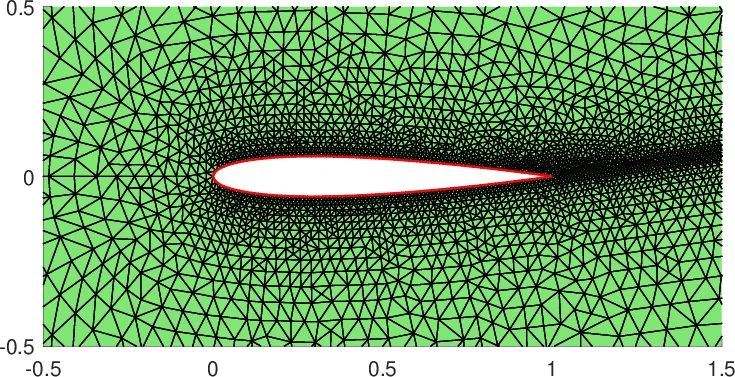
This paper summarizes the development of varFEM, which provides a realization of the programming style in FreeFEM by using the Matlab language.
💡 Research Summary
The paper presents varFEM, a MATLAB‑based framework that brings the “variational formulation based programming” paradigm—originally popularized by the FreeFEM software—into the MATLAB environment. The authors argue that while FreeFEM’s object‑oriented C++ implementation offers a powerful way to write finite element (FEM) codes directly from the weak form of a PDE, its syntax can be opaque for many users. MATLAB, by contrast, provides an interpreted, matrix‑oriented language that is widely used in engineering and scientific computing. varFEM therefore aims to combine the clarity of variational programming with MATLAB’s accessibility.
Core Idea
The central concept is a one‑to‑one mapping between the mathematical variational form and MATLAB code. The user supplies three cell arrays:
- Coef – coefficients (functions, constants, or pre‑computed arrays) such as diffusion a(x), reaction c(x), Robin data g_R, source f, etc.
- Test – strings describing the test functions (e.g.,
'v.grad','v.val'). - Trial – strings describing the trial functions (e.g.,
'u.grad','u.val').
A generic integration routine (int2d.m for 2‑D domain integrals, int1d.m for 1‑D boundary integrals) reads these specifications, evaluates the basis functions and their derivatives on Gaussian quadrature points (order selectable via quadOrder), and returns element‑wise contributions. The assembly functions (assem2d.m for scalar forms, int2d.m for vector forms) then collect all local contributions into global sparse matrices using MATLAB’s sparse constructor.
Mesh Data Structures
varFEM reuses the mesh data structures from the iFEM project. A mesh is stored in a MATLAB struct Th containing:
Th.node– N × 2 array of vertex coordinates.Th.elem– NT × 3 array of vertex indices for each triangle (counter‑clockwise ordering).Th.edge– NE × 2 array of edge endpoint indices, sorted so thatedge(k,1) < edge(k,2).Th.elem2edge– mapping from local edge numbers to global edge indices.- Boundary information (
Th.bdEdge,Th.bdEdgeType,Th.bdStr) is generated automatically byFeMesh2d.mbased on user‑provided logical expressions such as'x==1'or'y>0.99'.
Only conforming Lagrange elements of order k ≤ 3 (P1, P2, P3) are currently supported, but the design can be extended to other element families.
Assembly Mechanics
For a scalar bilinear form (a(v,u)=\int_\Omega a,\nabla v\cdot\nabla u + \int_\Omega c,v u), the routine proceeds as follows:
- Quadrature preparation – Gaussian points and weights are computed once per element.
- Basis evaluation –
Base2d.mreturns matricesv_i(:,p)andu_j(:,p)containing the values of the selected derivatives (or values) of the basis functions at each quadrature point p. - Local matrix computation – For each pair (i,j) the code evaluates
area .* sum( ww .* v_i .* u_j , 2 ), wherewwis the replicated weight vector. - Global assembly – Local matrices are reshaped into a vector
K(:)and combined with index vectorsiiandjj(generated byassem2d.m) to form the global sparse matrixK = sparse(ii, jj, K(:), Ndof, Ndof).
Vector‑valued forms (e.g., linear elasticity) are handled by expanding the tensorial expression ε(v):ε(u) into scalar products using getExtendedvarForm.m. The user simply writes the coefficient vector Coef = {1,1,0.5} and the test/trial strings {'v1.dx','v2.dy','v1.dy+v2.dx'} etc.; the routine automatically constructs all six terms of the strain‑stress inner product.
Boundary integrals are assembled analogously with int1d.m. For Robin conditions the coefficient g_R is multiplied by the test and trial values on the boundary edges, and the resulting contributions are added to the stiffness matrix. Neumann data are incorporated into the load vector in the same way.
Demonstrated Applications
The authors provide a suite of tutorial scripts illustrating the versatility of varFEM:
- Poisson problem – complete implementation (
varPoisson) of the model problem (2.1) with mixed Dirichlet/Robin conditions. - Linear elasticity – vector‑valued displacement field, stress‑strain bilinear form, and application of Dirichlet displacement constraints.
- Mixed FEM – biharmonic equation (using (C^0) interior penalty) and Stokes flow (velocity–pressure coupling) with different trial/test spaces.
- Heat equation – time‑stepping loop that repeatedly calls
int2d/int1dto assemble mass and stiffness matrices for implicit/explicit schemes. - Complex problems – examples with spatially varying coefficients, non‑uniform meshes, and multiple boundary parts, demonstrating the flexibility of the
bdStrmechanism.
Each example follows the same high‑level pattern: define a PDE data structure (pde), generate a mesh (Th = FeMesh2d(...)), call the appropriate assembly routine, apply boundary conditions with apply2d, and solve the resulting linear system.
Strengths and Limitations
Strengths
- Clarity – The code mirrors the mathematical weak form; users can read a line of MATLAB and immediately recognize the underlying integral.
- MATLAB ecosystem – Easy integration with plotting, post‑processing, and other toolboxes.
- Sparse efficiency – Global assembly is performed in a single
sparsecall, comparable to iFEM performance. - Extensibility – By changing the strings in
Test/Trialand providing custom coefficient functions, users can implement a wide range of PDEs without touching low‑level assembly code.
Limitations
- 2‑D only – Current implementation handles only triangular meshes in the plane; 3‑D tetrahedral support is not yet available.
- Element order – Only conforming Lagrange elements up to degree three are implemented; higher‑order or non‑Lagrange families would require additional basis generation code.
- Non‑linear PDEs – No automatic Jacobian or automatic differentiation; users must manually code Newton linearizations.
- Performance ceiling – For very large problems, MATLAB’s interpreted nature may become a bottleneck compared to compiled FreeFEM or C++ FEM libraries.
Conclusions and Outlook
varFEM successfully translates the variational formulation based programming paradigm into MATLAB, offering a bridge between theoretical FEM coursework and practical implementation. It enables rapid prototyping, educational demonstrations, and the migration of FreeFEM scripts to a MATLAB workflow. Future work suggested by the authors includes extending the framework to three dimensions, supporting higher‑order and mixed element families, and integrating automatic differentiation for robust handling of nonlinear PDEs. With these enhancements, varFEM could evolve into a comprehensive, open‑source FEM platform that leverages MATLAB’s user‑friendly environment while preserving the mathematical elegance of variational programming.
Comments & Academic Discussion
Loading comments...
Leave a Comment