A Neophyte With AutoML: Evaluating the Promises of Automatic Machine Learning Tools
💡 Research Summary
**
The paper “A Neophyte With AutoML: Evaluating the Promises of Automatic Machine Learning Tools” investigates how well three popular AutoML frameworks—TPOT, AutoKeras, and AutoGluon—serve users with little or no background in machine learning. The authors adopt a dual‑focus approach: quantitative performance (accuracy on a real‑world banking competition dataset) and qualitative user‑experience (UX) aspects such as documentation quality, ease of first use, and logging facilities.
Motivation and Related Work
AutoML promises to democratize machine learning by automatically constructing pipelines, yet most prior studies evaluate only predictive performance or benchmark creation. Few examine the usability challenges that novices encounter. The authors therefore position their work within three strands of related literature: benchmark papers that compare AutoML systems on accuracy, papers that introduce new AutoML tools, and analyses of AutoML challenges (e.g., ChaLearn). They note a gap in systematic UX evaluation.
Methodology
Three tools were selected based on popularity, openness, cost, and functional breadth. TPOT (genetic programming over scikit‑learn), AutoKeras (Bayesian‑optimized neural‑architecture search on Keras), and AutoGluon (ensemble‑centric approach combining ML and DL) represent distinct algorithmic philosophies.
The dataset originates from a Russian banking competition where participants predict a client’s age‑group (four classes) from transaction records. After preprocessing, the authors reduced the original 30 000 × 1 015 matrix to a manageable 5 000 × 1 015, then further limited experiments to three training sizes: 250, 500, and 1 000 rows (all with 1 015 features). This scaling reflects the constraints of a consumer‑grade workstation (GTX 1050 Ti, i7‑7700HQ, 24 GB RAM).
Performance evaluation follows a uniform pipeline: data cleaning (remove NaNs), feature engineering (aggregate numeric columns), train‑test split (first N rows for training, last M rows for testing, preserving class balance), model creation (default parameters for TPOT and AutoGluon; max_trials = 5 or 20 for AutoKeras), fitting, and accuracy calculation (same metric as the competition).
UX assessment is based on three criteria devised by the authors: (1) Documentation – presence of quick‑start tutorials, documented integrations, and detailed reference material; (2) Simplicity of First Use – number of code lines required to launch a model, ease of exporting/importing models; (3) Logging – clarity, completeness, and customizability of runtime logs. The authors’ hands‑on experience serves as the primary source of qualitative judgments.
Results
Performance: On the 1 000‑row subset, AutoGluon achieved the highest accuracy (0.597) with a reasonable training time. TPOT produced comparable accuracy but required substantially longer runtimes (over two hours). AutoKeras was the fastest when max_trials was low (training completed in under 2 000 seconds) but its accuracy lagged behind (≈0.45). A baseline CatBoost model outperformed all AutoML tools on the 250‑ and 500‑row experiments, highlighting that traditional models can still dominate on small datasets.
Documentation: TPOT’s documentation is extensive but geared toward developers familiar with scikit‑learn; quick‑start sections are present but not beginner‑centric. AutoKeras offers clear tutorials for image/text tasks, yet integration examples are limited. AutoGluon provides the most balanced documentation, with step‑by‑step notebooks, API references, and practical tips for non‑experts.
First‑Use Simplicity: AutoGluon requires the fewest lines of code to launch a tabular model (typically a single fit call) and includes straightforward save/load functions. TPOT demands a pipeline definition and a separate export step, increasing initial friction. AutoKeras needs explicit max_trials configuration, and while the API is concise, users must understand the concept of neural‑architecture search.
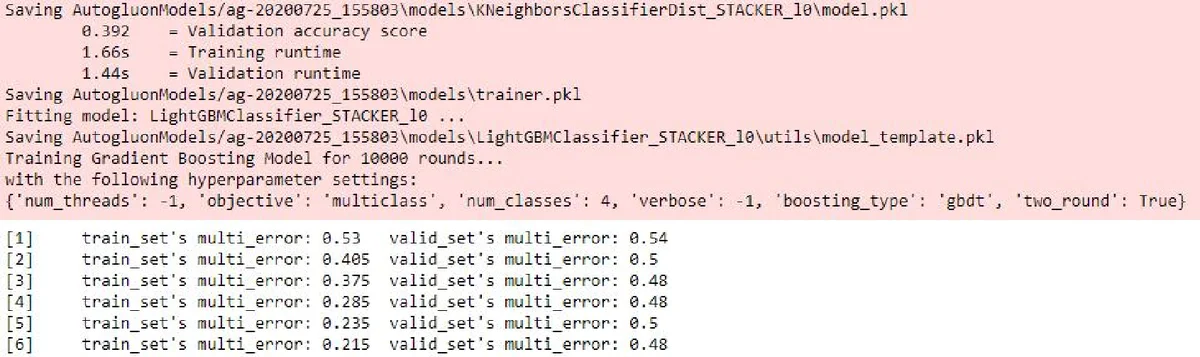
Logging: AutoGluon emits a structured, color‑coded console log and optional HTML dashboard that visualizes model performance and ensemble weights. TPOT’s logs are minimal, offering only basic progress messages. AutoKeras leverages Keras’ TensorBoard integration, which is powerful but requires additional setup; default console output is sparse.
Discussion and Recommendations
The authors argue that AutoML tools can indeed lower the barrier to machine learning, but the user experience varies dramatically. They recommend:
- Documentation Tiering – Separate “quick‑start” guides for novices from deep‑dive API references, and include ready‑made example datasets.
- Zero‑Configuration Entry Points – Provide a single‑function interface that automatically handles preprocessing, model selection, and export, minimizing the code footprint for first‑time users.
- Built‑In, Customizable Logging Dashboards – Offer out‑of‑the‑box visual logs that can be toggled between concise and verbose modes, aiding debugging without extra configuration.
- Baseline Model Suggestions – AutoML systems should automatically benchmark simple models (e.g., CatBoost, LightGBM) on small data and present them as viable alternatives.
- Broader UX Studies – Future work should involve larger, more diverse user groups and quantitative UX metrics (e.g., SUS scores) to validate the qualitative findings.
Conclusion
The study demonstrates that while all three AutoML frameworks can produce models that surpass random guessing, AutoGluon stands out as the most balanced solution for novices, delivering higher accuracy, acceptable training time, and a user‑friendly experience. Nevertheless, the paper highlights that true democratization of machine learning requires continued focus on documentation clarity, frictionless onboarding, and transparent logging. By addressing these UX dimensions, AutoML tools can better fulfill their promise of making machine learning accessible to a broader audience, including those with minimal technical background.
Comments & Academic Discussion
Loading comments...
Leave a Comment