Machines that test Software like Humans
Automated software testing involves the execution of test scripts by a machine instead of being manually run. This significantly reduces the amount of manual time & effort needed and thus is of great interest to the software testing industry. There have been various tools developed to automate the testing of web applications (e.g. Selenium WebDriver); however, the practical adoption of test automation is still miniscule. This is due to the complexity of creating and maintaining automation scripts. The key problem with the existing methods is that the automation test scripts require certain implementation specifics of the Application Under Test (AUT) (e.g. the html code of a web element, or an image of a web element). On the other hand, if we look at the way manual testing is done, the tester interprets the textual test scripts and interacts with the AUT purely based on what he perceives visually through the GUI. In this paper, we present an approach to build a machine that can mimic human behavior for software testing using recent advances in Computer Vision. We also present four use-cases of how this approach can significantly advance the test automation space making test automation simple enough to be adopted practically.
💡 Research Summary
The paper addresses the long‑standing problem that test automation tools such as Selenium WebDriver and Sikuli are rarely adopted in practice because they require detailed knowledge of the application’s implementation (HTML IDs, XPaths, pixel‑perfect images) and consequently suffer from high creation and maintenance costs. The authors observe that manual testing does not rely on such low‑level details; a human reads a natural‑language test script, visually locates the described GUI element, and performs the required action. To bridge this gap, they propose a machine that mimics human behavior by combining a domain‑specific language (DSL) for authoring test steps with recent advances in computer‑vision‑based object detection.
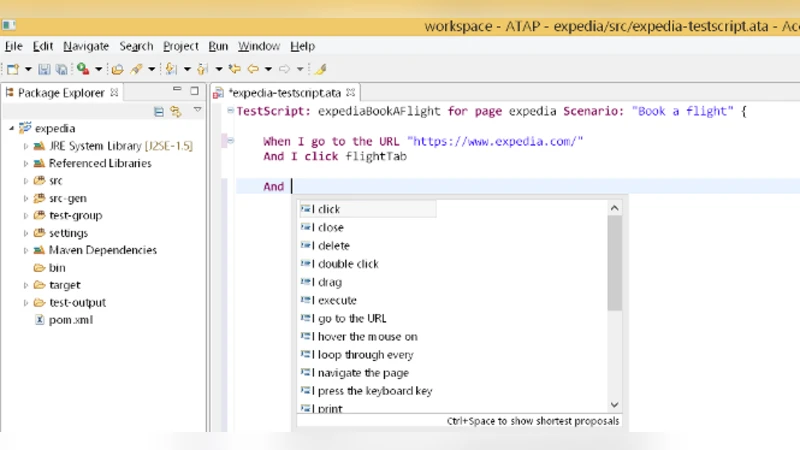
The DSL is built on the xBase framework and restricts testers to a small, English‑like vocabulary (e.g., “When I click ‘Search’ button”, “Enter ‘New York’ into textbox ‘Flying From’”). This constrained natural language is easy for non‑programmers to learn, yet deterministic enough for reliable parsing. During execution, the DSL script is parsed into a sequence of high‑level actions and textual descriptions of target UI elements.
For each target element the system takes a screenshot of the current application window and runs an OCR engine to extract all visible text. The textual label from the DSL step is then fed, together with the OCR output, into a deep neural network that predicts the (x, y) screen coordinates of the element. The network architecture follows the model described in Hu et al. (2015): a convolutional neural network (CNN) extracts visual features from the screenshot, while a Long Short‑Term Memory (LSTM) component learns the relationship between the textual label and visual context. The authors trained this model on a modest dataset of roughly 2,200 manually annotated UI elements covering four widget types (buttons, text boxes, links, dropdowns). The trained model yields moderate accuracy; the authors acknowledge that larger, more diverse training data and transfer‑learning techniques would improve performance.
Once coordinates are obtained, the Java Robot class is used to synthesize mouse clicks, keyboard input, and dropdown selections, thereby completing the test step without any direct interaction with the DOM or image‑matching libraries. This approach eliminates the need for HTML IDs, XPath expressions, or pre‑captured element images, making scripts resilient to changes in underlying code, layout, or visual styling.
Four use‑cases illustrate the benefits:
- Implementation‑agnostic scripting – The same DSL step can replace Selenium code that requires an element ID and Sikuli code that needs an image file.
- Support for non‑web GUIs – Actions such as clicking a Windows file‑open dialog are expressed identically to web actions, overcoming Selenium’s limitation to browsers.
- Exploitation of visual relationships – Elements can be referenced via nearby labels (e.g., “the dropdown next to ‘Title’”), a capability absent in code‑based tools.
- Robustness to UI changes – When an element’s ID changes or its visual position shifts, the DSL script remains valid because the vision model re‑locates the element based on its label.
The solution is integrated into the Eclipse IDE, providing code completion for DSL commands and a visual preview of the parsed steps. The authors report that testers quickly adapt to the DSL, and parsing of scripts is reliable. However, the object‑recognition component currently handles only a limited set of widget types and shows only moderate success on the small training set. OCR errors, ambiguous labels, and dynamic content (e.g., AJAX‑loaded elements) are identified as challenges for future work.
In conclusion, the paper proposes a novel “human‑like” test automation framework that decouples test scripts from implementation specifics by leveraging a constrained natural‑language DSL and a CNN‑LSTM visual recognizer. Preliminary results are promising, suggesting that with larger training corpora, richer UI element coverage, and integration into CI/CD pipelines, this approach could significantly lower the barrier to test automation adoption in industry.
Comments & Academic Discussion
Loading comments...
Leave a Comment