The Game of Phishing
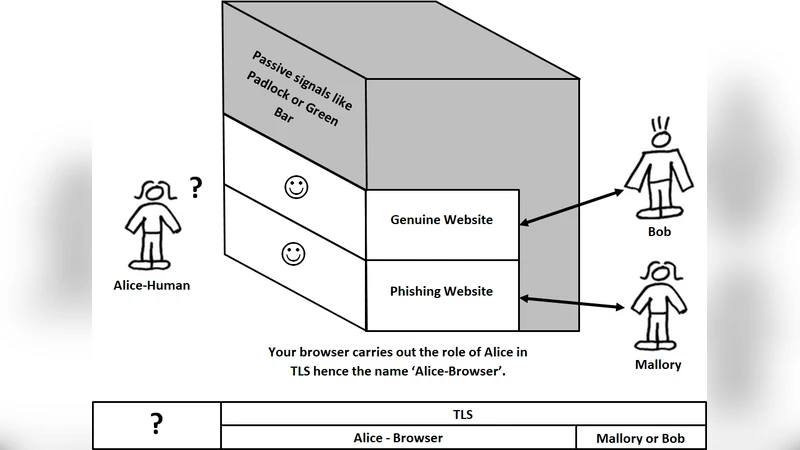
The current implementation of TLS involves your browser displaying a padlock, and a green bar, after successfully verifying the digital signature on the TLS certificate. Proposed is a solution where your browser’s response to successful verification of a TLS certificate is to display a login window. That login window displays the identity credentials from the TLS certificate, to allow the user to authenticate Bob. It also displays a ‘user-browser’ shared secret i.e. a specific picture from your hard disk. This is not SiteKey, the image is shared between the computer user and their browser. It is never transmitted over the internet. Since sandboxed websites cannot access your hard disk this image cannot be counterfeited by phishing websites. Basically if you view the installed software component of your browser as an actor in the cryptography protocol, then the solution to phishing attacks is classic cryptography, as documented in any cryptography textbook.
💡 Research Summary
The paper “The Game of Phishing” critiques the current user‑facing indicators of TLS – the padlock icon or a green address bar – as insufficient defenses against phishing. Users typically rely on these visual cues alone to decide whether a site is trustworthy, and attackers can easily mimic them. To address this weakness, the authors propose a new browser‑side authentication step that treats the browser itself as an active participant in the cryptographic protocol.
In the proposed design, each user selects a personal image stored locally on the hard‑disk and registers it with the browser as a “user‑browser shared secret.” When a TLS handshake succeeds and the server’s certificate is verified, the browser does not merely display a padlock; instead it opens a dedicated login window. This window shows two pieces of information: (1) the identity fields extracted from the server’s X.509 certificate (e.g., organization name, common name, validity dates) and (2) the pre‑shared secret image. Because modern browsers sandbox web content and prevent web pages from reading arbitrary files on the client’s file system, a phishing site cannot retrieve or reproduce the secret image. Consequently, a legitimate site will always display the user’s chosen picture, while a counterfeit site will either show a default placeholder or no image at all, alerting the user to a potential attack.
The authors argue that this approach does not require any changes to the TLS protocol itself; the only modification is an additional UI step after the existing certificate verification. The image never traverses the network, eliminating the risk of man‑in‑the‑middle manipulation of the secret. In cryptographic terms, the image functions as a secret key known only to the user and the trusted browser, effectively adding a second factor of authentication without involving the server.
While conceptually elegant, the paper acknowledges several practical challenges. First, user experience suffers if users must manage images for many services. Deciding whether to reuse a single image across all sites or to maintain a distinct image per site introduces cognitive overhead and may lead to insecure practices (e.g., choosing easily guessable pictures). Second, the visual prominence of the image is critical; if the picture is too small, low‑contrast, or placed in a location that users overlook, the protection collapses. Third, sophisticated phishing campaigns could attempt to spoof the browser UI itself—using pop‑ups, CSS overlays, or malicious extensions—to present a counterfeit login window that appears legitimate. The paper notes that such UI‑level attacks are not eliminated by the secret image alone.
Implementation also raises compatibility concerns. Current browsers tightly control extensions and UI modifications for security reasons. Adding a built‑in “shared‑secret image” feature would require changes to the browser’s security architecture, permission model, and possibly the handling of local file references under Content Security Policy (CSP). Moreover, the secret image must be stored securely on the client device; on systems without full‑disk encryption, an attacker with physical access could extract the image and defeat the scheme.
From a security‑model perspective, the proposal creates a three‑party verification loop: the browser, the server’s certificate, and the user’s secret image. This mirrors the classic public‑key infrastructure (PKI) augmented with a second factor, but the second factor is verified only locally. The server does not need to know the image, which simplifies deployment but also means that a compromised browser (e.g., malware that can read the stored image) would nullify the entire protection.
In summary, the paper contributes a novel, user‑centric augmentation to TLS that leverages a locally stored visual secret to thwart phishing. It demonstrates how classic cryptographic principles—shared secrets and mutual verification—can be applied at the UI layer without altering the underlying transport protocol. However, for the idea to become a viable, widely adopted defense, substantial work is required in user‑interface design, secret‑management ergonomics, browser security architecture, and standardization across vendors. If these hurdles are overcome, the approach could serve as a practical, low‑cost complement to existing phishing‑mitigation techniques such as EV certificates, browser warnings, and multi‑factor authentication.
Comments & Academic Discussion
Loading comments...
Leave a Comment