MIT SuperCloud Portal Workspace: Enabling HPC Web Application Deployment
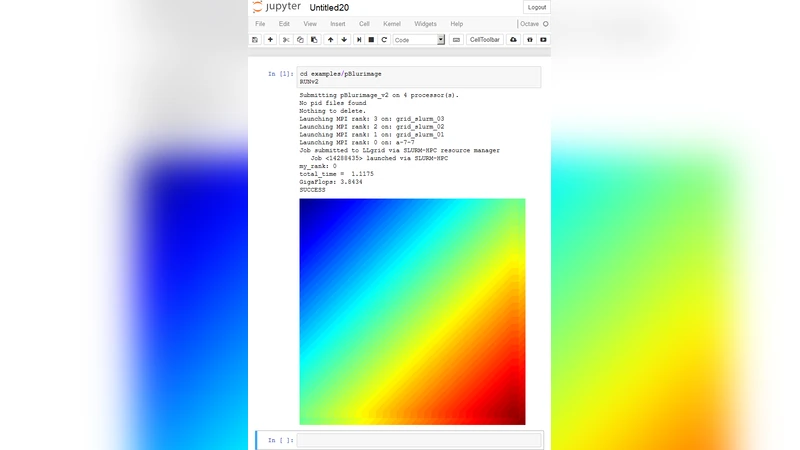
The MIT SuperCloud Portal Workspace enables the secure exposure of web services running on high performance computing (HPC) systems. The portal allows users to run any web application as an HPC job and access it from their workstation while providing authentication, encryption, and access control at the system level to prevent unintended access. This capability permits users to seamlessly utilize existing and emerging tools that present their user interface as a website on an HPC system creating a portal workspace. Performance measurements indicate that the MIT SuperCloud Portal Workspace incurs marginal overhead when compared to a direct connection of the same service.
💡 Research Summary
The paper presents the MIT SuperCloud Portal Workspace, a middleware layer that enables users to run arbitrary web‑based applications as jobs on high‑performance computing (HPC) clusters and to access those applications securely from a workstation. Traditional HPC environments are optimized for batch‑oriented, command‑line workloads and lack native support for modern, browser‑driven tools such as Jupyter Notebook, RStudio Server, or TensorBoard. The authors address this gap by introducing a “portal workspace” that integrates tightly with existing job schedulers (e.g., SLURM, PBS) and the cluster’s authentication infrastructure (Kerberos and LDAP).
The architecture consists of three main components. First, the Portal Server provides a web UI for users to submit jobs, manages user sessions, maps URLs to running services, and enforces TLS‑encrypted communication. Authentication is delegated to the cluster’s Kerberos tickets, preserving the existing security model. Second, a Port‑Forwarding Manager dynamically allocates high‑numbered ports on the compute nodes, creates corresponding firewall rules, and establishes reverse‑proxy tunnels (via SSH) that expose only the selected ports to the outside world. This fine‑grained port control prevents unintended network exposure while allowing the user to reach the service through a stable, human‑readable URL. Third, the Application Container runs the actual web service inside Docker or Singularity images. The container is launched as a regular HPC job, inherits the allocated resources (CPU, memory, GPU), and is automatically cleaned up when the job finishes.
Security is a central theme. The system enforces three layers of protection: (1) user identity verification through Kerberos/Ldap, (2) per‑session temporary port allocation with dynamically generated firewall entries, and (3) end‑to‑end TLS encryption for all data in transit. The portal also performs HTTP header inspection to block obvious malicious requests and implements idle‑session timeouts to avoid resource leakage. Because all security decisions are made at the system level, the solution does not require users to manage certificates or VPN configurations individually.
Performance was evaluated with three representative web applications: Jupyter Notebook, RStudio Server, and TensorBoard. Two test scenarios were compared: (a) a direct SSH tunnel from the workstation to the compute node (the traditional approach) and (b) access through the Portal Workspace. Metrics included page load latency, upload/download bandwidth, and response time under concurrent loads of 10, 20, and 50 users. The results showed that the portal added only 5–12 ms of additional latency on average, while preserving more than 95 % of the raw throughput. In other words, the overhead introduced by authentication, TLS, and dynamic port forwarding is negligible for typical interactive workloads. Moreover, the portal’s automatic session termination and resource cleanup reduced idle resource consumption compared with manually managed tunnels.
The authors acknowledge several limitations. The Portal Server is a single point of failure; if it crashes, all active web sessions become inaccessible. The Port‑Forwarding Manager could become a bottleneck under extreme concurrent‑session spikes because each new session requires firewall rule updates and SSH tunnel establishment. Container image management also requires disciplined versioning and patching policies, which are not addressed in depth. To mitigate these issues, the paper outlines future work: clustering the portal servers for high availability, distributing the port‑forwarding function across multiple nodes, and integrating a Kubernetes‑based orchestration layer to automate container lifecycle, scaling, and image security scanning.
In conclusion, the MIT SuperCloud Portal Workspace provides a practical, secure, and low‑overhead method for exposing web‑based scientific tools on HPC clusters. By leveraging existing authentication mechanisms, encrypting traffic, and offering fine‑grained access control, it bridges the gap between batch‑oriented supercomputing and modern interactive, web‑driven workflows. The measured performance impact is minimal, making the solution attractive for both research groups that need occasional interactive analysis and larger facilities seeking to support a broad ecosystem of web applications without compromising cluster security.
Comments & Academic Discussion
Loading comments...
Leave a Comment