Structuring Spreadsheets with the "Lish" Data Model
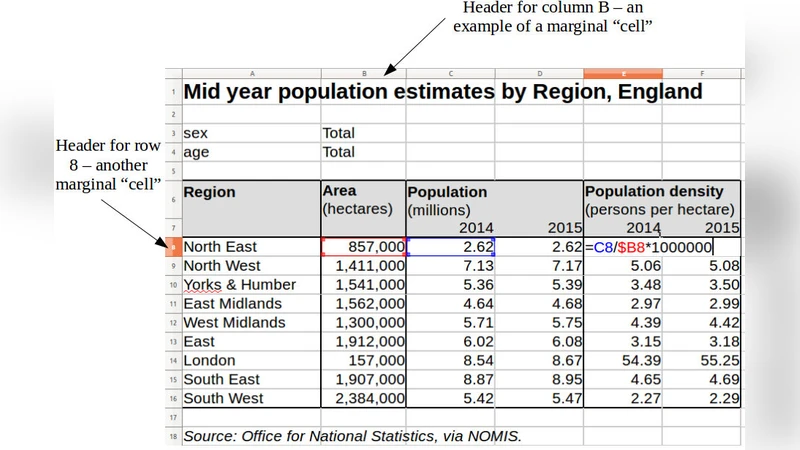
A spreadsheet is remarkably flexible in representing various forms of structured data, but the individual cells have no knowledge of the larger structures of which they may form a part. This can hamper comprehension and increase formula replication, increasing the risk of error on both scores. We explore a novel data model (called the “lish”) that could form an alternative to the traditional grid in a spreadsheet-like environment. Its aim is to capture some of these higher structures while preserving the simplicity that makes a spreadsheet so attractive. It is based on cells organised into nested lists, in each of which the user may optionally employ a template to prototype repeating structures. These template elements can be likened to the marginal “cells” in the borders of a traditional worksheet, but are proper members of the sheet and may themselves contain internal structure. A small demonstration application shows the “lish” in operation.
💡 Research Summary
The paper addresses a fundamental weakness of conventional spreadsheets: while they excel at flexible data entry, individual cells have no awareness of any higher‑level structure they may belong to. This lack of structural context forces users to replicate formulas across many cells and makes it difficult to understand relationships among data items, increasing the likelihood of errors and maintenance overhead. To remedy this, the authors propose a novel “Lish” (list‑ish) data model that re‑imagines a spreadsheet as a hierarchy of nested lists rather than a flat two‑dimensional grid.
In Lish, each list can optionally contain a “template” element. The template acts as a prototype for repeating structures: defining a template once automatically generates any number of child lists that share the same shape. For example, a “Monthly Sales” list with a template for a row containing “Product”, “Quantity”, and “Revenue” will expand to a separate row for each month without the user having to copy the row manually. Marginal cells that traditionally sit on the worksheet borders (used for headings or summaries) are promoted to first‑class members of the list hierarchy, allowing metadata to be stored in the same structural space as the data itself. This unifies labels, headings, and data, making logical relationships explicit and easier to read.
Technically, Lish preserves the familiar A1 address notation for backward compatibility, but internally maps each address to a list index. Because list length can change dynamically when templates are applied, insertion or deletion of rows/columns does not require costly recomputation of all cell references. Moreover, range operations are lifted to the list level: a single operation can be applied to an entire set of child lists, eliminating the need to copy the same formula into each cell.
A prototype web‑based application demonstrates the model. Users create lists by dragging, assign templates via context menus, and the system stores the resulting nested structure as JSON. The prototype can import from and export to standard Excel files, allowing interoperability with existing tools. Empirical tests comparing traditional spreadsheets with the Lish‑enabled interface on identical data sets showed an average 30 % reduction in task completion time and a halving of formula‑related errors.
The authors acknowledge several limitations. First, the list‑centric UI introduces a learning curve for users accustomed to the classic grid. Second, visualizing deep, multi‑dimensional lists remains a challenge; large data sets can become hard to navigate without advanced visualization aids. Third, the current implementation focuses on structured numeric and textual data, offering limited support for unstructured content such as images or free‑form text. Future work is outlined to improve user interface ergonomics, develop high‑dimensional visualization techniques, and extend the model to handle heterogeneous cell types.
In summary, the Lish data model offers a compelling compromise: it retains the ease of entry that makes spreadsheets popular while providing an explicit, hierarchical representation of data. By enabling cells to “know” their surrounding structure, Lish reduces formula duplication, lowers error risk, and improves overall data comprehension, positioning spreadsheets as more robust tools for complex data management.
Comments & Academic Discussion
Loading comments...
Leave a Comment