EasyInterface: A toolkit for rapid development of GUIs for research prototype tools
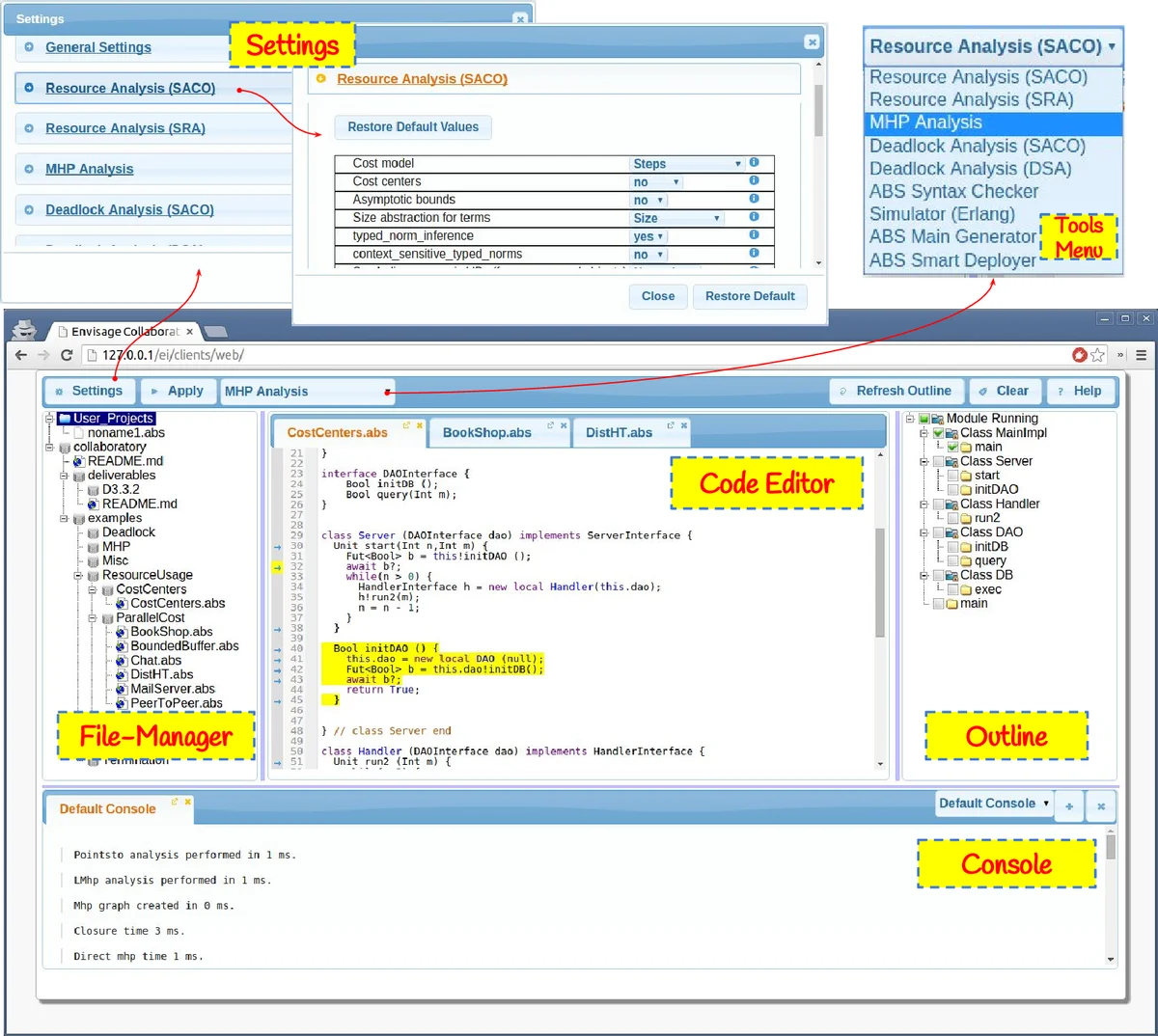
In this paper we describe EasyInterface, an open-source toolkit for rapid development of web-based graphical user interfaces (GUIs). This toolkit addresses the need of researchers to make their research prototype tools available to the community, and integrating them in a common environment, rapidly and without being familiar with web programming or GUI libraries in general. If a tool can be executed from a command-line and its output goes to the standard output, then in few minutes one can make it accessible via a web-interface or within Eclipse. Moreover, the toolkit defines a text-based language that can be used to get more sophisticated GUIs, e.g., syntax highlighting, dialog boxes, user interactions, etc. EasyInterface was originally developed for building a common frontend for tools developed in the Envisage project.
💡 Research Summary
The paper presents EasyInterface, an open‑source toolkit designed to bridge the gap between command‑line research prototype tools and user‑friendly graphical interfaces with minimal effort. The authors identify a common problem in academic software development: researchers frequently create a suite of command‑line utilities (e.g., analyzers, compilers, simulators) that evolve rapidly, yet building dedicated GUIs for each tool is time‑consuming and often postponed until the tool stabilises. EasyInterface addresses this by providing a declarative, server‑client architecture that allows any command‑line program whose output is written to standard output to be exposed through a web interface, an Eclipse plug‑in, or a remote shell within minutes, without requiring the developer to write any web or GUI code.
The server component is implemented in PHP on top of a standard HTTP server. Tools are registered by supplying an XML configuration file (e.g., myapp.cfg). This file contains two essential sections: an execution template (<cmdlineapp>) that specifies how to invoke the tool, and a <parameters> block that declares accepted command‑line options, their prefixes, validation rules, and default values. The template can embed special placeholders such as _ei_parameters, _ei_files, _ei_outline, _ei_execid, _ei_stream, _ei_download, _ei_sessionid, and _ei_clientid. During request processing, the server substitutes these placeholders with concrete values supplied by the client (e.g., uploaded source files, outline entities, unique execution identifiers) and then safely executes the generated shell command, capturing its standard output. Security is enforced by strict parameter validation, execution time limits, and sandboxing that prevents arbitrary command injection.
Clients communicate with the server via HTTP POST requests containing JSON payloads that specify the tool ID, selected parameters, and any uploaded files. The toolkit currently ships three client implementations: a web‑based IDE‑style interface, an Eclipse plug‑in (still under development), and a remote command‑line shell. The web client, built with JavaScript, jQuery, CodeMirror, and JSTree, offers a code editor, file manager, outline view, console, and a toolbar. The typical workflow is: (1) edit or load a source file, (2) generate an outline of its structure, (3) select a tool from the drop‑down menu, (4) configure tool‑specific parameters through automatically generated UI widgets, and (5) click “Run”. The client then packages the source, selected outline entities, and parameter values into a JSON request and sends it to the server. The server executes the tool and streams the textual output back to the console.
A distinctive feature of EasyInterface is its output language, a lightweight XML dialect that enables tools to produce rich visual feedback without embedding client‑specific code. Tags such as <highlightlines> and <oncodelineclick> allow a tool to request line highlighting, open dialog boxes, or trigger actions when the user interacts with specific code lines. Because all EasyInterface clients interpret this language uniformly, a single tool implementation can provide consistent visual effects across the web UI, the Eclipse plug‑in, and any future clients. The language also supports streaming and file‑download modes: a tool can write incremental results to a temporary directory referenced by _ei_stream, and the client periodically polls for new chunks; large binary artifacts can be placed in a directory referenced by _ei_download, and the client receives a <download> command that triggers a file‑transfer request.
The authors report successful integration of a heterogeneous set of tools from the ENVISAGE project—including parsers, type‑checkers, compilers, simulators, dead‑lock detectors, and worst‑case cost analyzers—into a unified web‑based environment. Their experience suggests that the methodology scales well: as tools evolve, only the XML configuration or occasional output‑language adjustments are needed, while the surrounding GUI remains untouched.
Future work outlined in the paper includes completing the Eclipse plug‑in, providing language‑specific libraries that simplify generation of EasyInterface output commands, and expanding the client ecosystem. In summary, EasyInterface offers (1) rapid exposure of command‑line research tools as web or IDE components, (2) a declarative configuration model that abstracts execution details, (3) a portable output language for rich, client‑independent UI feedback, and (4) built‑in security and resource‑management mechanisms, thereby substantially lowering the barrier for researchers to share and maintain prototype tools.
Comments & Academic Discussion
Loading comments...
Leave a Comment