Developing a Repeating Model Using the Structured Spreadsheet Modelling and Implementation Methodology
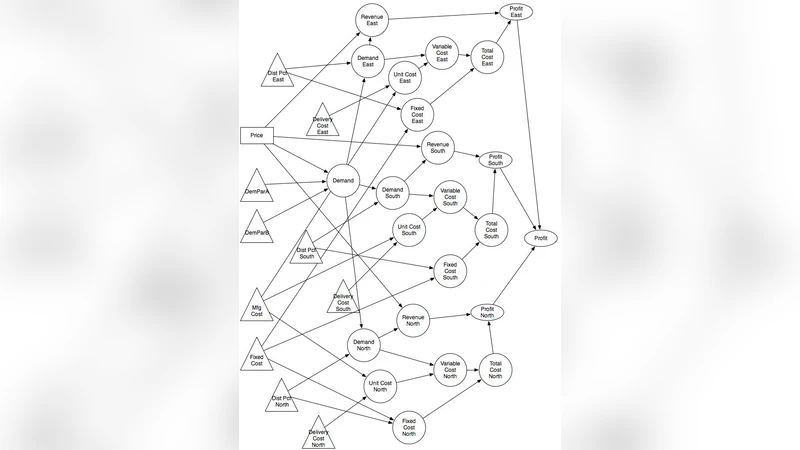
Spreadsheets often have variables and formulas that are similar, differing only by the fact that they refer to different instances of an entity. For example, the calculation of the sales revenues of the South and East regions are Revenues South = Price * Quantity Sold South and Revenues East = Price * Quantity Sold East. In this paper, we present a conceptual modelling approach that takes advantage of these similarities and leads the spreadsheet developer to the formula Revenues = Price * Quantity. We then present simple but strict rules to implement the spreadsheet.
💡 Research Summary
The paper addresses a pervasive problem in spreadsheet development: the proliferation of nearly identical variables and formulas that differ only by the entity they reference (e.g., regional sales, product lines, time periods). Traditional spreadsheet construction often relies on manual copy‑and‑paste, which leads to duplicated logic, difficult maintenance, and a high risk of errors. To overcome these shortcomings, the authors propose a conceptual modeling approach that extracts the common pattern among such variables and replaces the multitude of specific formulas with a single, generalized expression.
The methodology is organized around three core steps. First, the “entity identification” phase maps each cell to an entity (such as South, East, or a specific product) and its associated attributes (price, quantity, cost, etc.). This mapping is recorded in a meta‑data sheet where every cell receives two tags: an entity identifier and a core variable name. Second, the “common variable extraction” phase groups cells that share the same core variable, stripping away the entity suffixes. For example, Revenue_South and Revenue_East are both recognized as instances of the core variable Revenue. Third, the “generalized formula definition” phase constructs a single formula that takes the entity index as a parameter and dynamically retrieves the appropriate attribute values using lookup functions (INDEX, MATCH, OFFSET) or array formulas. The result is a compact expression such as Revenue = Price
Comments & Academic Discussion
Loading comments...
Leave a Comment