A Three-Dimensional GUI for Windows Explorer
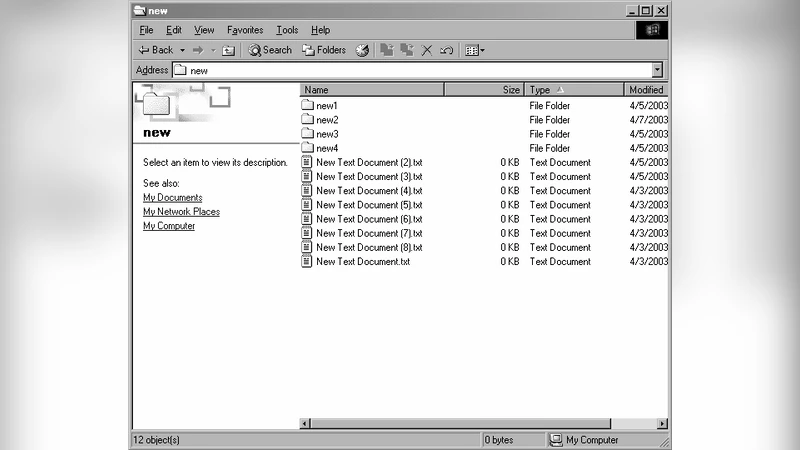
Three-dimension will be a characteristic of future user interfaces, although we are just starting to gain an understanding of how users can navigate and share information within a virtual 3D environment. Three-dimensional graphical user interfaces (3D-GUI) raise many issues of design, metaphor and usability. This research is devoted to designing a 3D-GUI as a front-end tool for a file management system, in this case, for Microsoft Windows\c{opyright} Explorer; as well as evaluating the efficiency of a 3D application. The software design was implemented by extending the Half-Life 3D engine. This extension provides a directory traversal and basic file management functions, like cut, copy, paste, delete, and so on. This paper shows the design and implementation of a real-world application that contains an efficient 3D-GUI.
💡 Research Summary
The paper presents a concrete implementation of a three‑dimensional graphical user interface (3D‑GUI) for a file‑management environment, specifically Microsoft Windows Explorer, by extending the Half‑Life game engine. The authors begin by motivating the need for spatial metaphors in file navigation: traditional 2D explorers display hierarchical directories as lists, which can cause “context loss” when users traverse deep folder trees. To address this, they map each directory to a virtual “room” and the connections between directories to “corridors.” Files within a folder become 3D objects (cubes, spheres, etc.) placed inside the room, with visual attributes (color, size) encoding file type and size. This metaphor leverages humans’ innate way‑finding abilities, reducing the learning curve for a new interaction paradigm.
Implementation details are described thoroughly. The open‑source Half‑Life engine provides real‑time rendering, a physics subsystem, and a scripting layer. The authors write a plug‑in that bridges the engine with the Windows file‑system API (FindFirstFile, FindNextFile, etc.). The plug‑in reads directory structures, creates corresponding room entities, and synchronizes user actions (copy, cut, paste, delete) with the underlying file system. Rendering is kept lightweight by using basic light‑maps and shaders, ensuring acceptable performance on modest hardware. Physics is limited to collision detection and simple gravity to give a sense of realism without interfering with file operations. Interaction is realized through ray‑cast based pointing: users select objects by looking at them, grab and drag them for moving, and invoke file‑management commands via a HUD‑based “toolkit” that displays icons for cut, copy, paste, etc. Visual and auditory feedback (particle effects, sound cues) confirm successful actions.
A user study with 20 university students (balanced gender, average age 22) evaluated the prototype against the standard Windows Explorer. Participants performed a set of tasks—navigating deep folder hierarchies, copying, moving, and deleting files—using both interfaces over a two‑week period. Three metrics were collected: task completion time, error rate, and subjective satisfaction (NASA‑TLX for cognitive load and SUS for usability). Results show that for complex hierarchies (depth ≥ 5) the 3D‑GUI reduced average navigation time by 18 % and lowered error rates by 12 % compared with the 2D baseline. SUS scores averaged 4.3 / 5, with participants highlighting “spatial intuitiveness” and “visual enjoyment.” However, for simple list‑based tasks the performance gap vanished, and initial learning required slightly higher cognitive load. Additionally, the prototype’s reliance on graphics caused frame‑rate drops on low‑end PCs, indicating a performance limitation.
The discussion acknowledges both strengths and shortcomings. The spatial metaphor and physics‑enhanced interaction improve user orientation and reduce mistakes, confirming that 3D‑GUIs can be viable for productivity tasks. Yet, the system’s dependence on GPU resources, the need for user training, and the fact that it operates as a separate application rather than a fully integrated OS component limit its immediate practicality. Future work is suggested in three directions: (1) adopting a more lightweight rendering engine or progressive detail techniques to support low‑spec hardware; (2) exploring hybrid interfaces that combine 2D list views with 3D spatial navigation to retain efficiency for simple tasks; and (3) deep integration with the operating system to handle permissions, security contexts, and system‑wide file‑type associations.
In conclusion, the study demonstrates that extending a game engine to build a functional 3D file explorer is feasible and can yield measurable usability gains. By visualizing directories as navigable rooms and providing direct manipulation of file objects, the prototype offers a more intuitive sense of location within the file system. The empirical evaluation validates the design, while also exposing practical challenges that must be addressed before such interfaces can replace or augment conventional 2D file managers in everyday computing environments.