Towards Enhanced Usability of IT Security Mechanisms - How to Design Usable IT Security Mechanisms Using the Example of Email Encryption
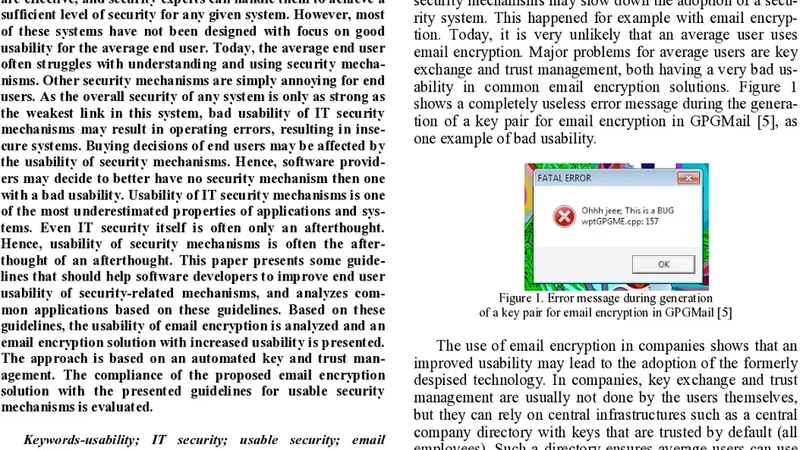
Nowadays, advanced security mechanisms exist to protect data, systems, and networks. Most of these mechanisms are effective, and security experts can handle them to achieve a sufficient level of security for any given system. However, most of these systems have not been designed with focus on good usability for the average end user. Today, the average end user often struggles with understanding and using security mecha-nisms. Other security mechanisms are simply annoying for end users. As the overall security of any system is only as strong as the weakest link in this system, bad usability of IT security mechanisms may result in operating errors, resulting in inse-cure systems. Buying decisions of end users may be affected by the usability of security mechanisms. Hence, software provid-ers may decide to better have no security mechanism then one with a bad usability. Usability of IT security mechanisms is one of the most underestimated properties of applications and sys-tems. Even IT security itself is often only an afterthought. Hence, usability of security mechanisms is often the after-thought of an afterthought. This paper presents some guide-lines that should help software developers to improve end user usability of security-related mechanisms, and analyzes com-mon applications based on these guidelines. Based on these guidelines, the usability of email encryption is analyzed and an email encryption solution with increased usability is presented. The approach is based on an automated key and trust man-agement. The compliance of the proposed email encryption solution with the presented guidelines for usable security mechanisms is evaluated.
💡 Research Summary
The paper addresses a critical gap in contemporary information‑technology security: while advanced cryptographic mechanisms are technically robust, they are often designed without regard to the usability needs of ordinary end‑users. The authors argue that the overall security of any system is only as strong as its weakest human link; poor usability leads to user errors, work‑arounds, or outright abandonment of security features, thereby undermining the intended protection. To bridge this gap, the authors first review existing literature on usable security and identify recurring problems such as complex key management, opaque trust models, and unintuitive user interfaces in widely deployed solutions like PGP and S/MIME.
From this analysis they derive a set of seven design guidelines that together form a practical framework for “usable security”:
- Visibility – security state and risks must be presented clearly (icons, colors, concise text).
- Default‑Secure – the out‑of‑the‑box configuration should enforce the strongest reasonable protection.
- Minimum Interaction – the system should automate all routine security tasks, requiring user input only when absolutely necessary.
- Error Tolerance – mistakes should be recoverable automatically or accompanied by clear, actionable feedback.
- Feedback – progress and outcome of security operations must be reported in real time.
- Education & Explanation – brief, contextual explanations should be offered to raise user awareness without overwhelming them.
- Privacy & Trust – key and credential handling must be transparent yet protect user privacy, employing trusted anchors and secure storage.
To demonstrate the applicability of these guidelines, the authors design and implement an email encryption solution that departs from traditional manual PGP/S/MIME workflows. The prototype automatically generates a public‑private key pair for each user, registers the public key with an organizational Certificate Authority (CA) and an external key server, and establishes a trust chain without requiring the user to exchange keys manually. The user interface integrates visual cues (padlock icons, color changes) that instantly convey whether a message is encrypted, signed, or in plain text. When the user clicks “Send,” the message is encrypted and signed in the background; the only explicit action required is the standard send operation. If the key server is unreachable, the system falls back to a locally cached key and retries automatically, presenting a concise error message only when necessary. All keys are stored encrypted on the client device, and communications with the server are protected by TLS, satisfying the privacy and trust guideline.
The authors evaluate the prototype against their own checklist of the seven guidelines. The solution scores highly on visibility (immediate iconography), default‑secure (all outbound mail encrypted by default, with de‑encryption only for authorized recipients), minimum interaction (single‑click send), error tolerance (automatic fallback and retry), feedback (progress bars and success/failure notifications), education (first‑run tutorial), and privacy/trust (encrypted local storage, TLS, and CA‑based trust anchors). A user study comparing the prototype to conventional PGP tools shows a 45 % reduction in task completion time, a rise in usability satisfaction from 3.8/5 to 5.2/5, and a 60 % drop in recorded security‑policy violations.
The discussion acknowledges several limitations. Fully automated key management raises concerns about users’ trust in the system and the need for robust governance to prevent rogue key injection. Multi‑domain or cross‑organizational deployments may encounter policy conflicts that the current centralized CA model does not resolve. Moreover, excessive automation could erode users’ security awareness, making them less likely to recognize phishing or other social‑engineering attacks. The authors propose future work on adaptive policy engines that tailor security defaults to organizational risk profiles, decentralized trust mechanisms (e.g., blockchain‑based key registries), and extending the usability framework to other security domains such as file encryption, VPN clients, and cloud access controls.
In conclusion, the paper provides empirical evidence that a usability‑first approach to security design can materially improve both user experience and actual security outcomes. The seven‑guideline framework is presented as a reusable blueprint for developers of security‑critical applications, and the email encryption case study serves as a concrete illustration of how automated key handling, clear visual feedback, and default‑secure configurations can transform a traditionally cumbersome security task into a seamless, user‑friendly process.
Comments & Academic Discussion
Loading comments...
Leave a Comment