Secure User Authentication & Graphical Password using Cued Click-Points
The major problem of user registration, mostly text base password, is well known. In the login user be inclined to select simple passwords which is frequently in mind that are straightforward for atta
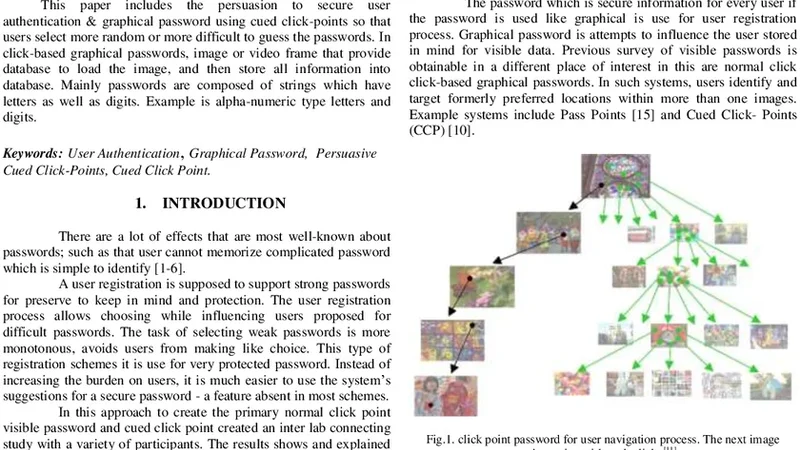
The major problem of user registration, mostly text base password, is well known. In the login user be inclined to select simple passwords which is frequently in mind that are straightforward for attackers to guess, difficult machine created password mostly complicated to user take in mind. User authenticate password using cued click points and Persuasive Cued Click Points graphical password scheme which includes usability and security evaluations. This paper includes the persuasion to secure user authentication & graphical password using cued click-points so that users select more random or more difficult to guess the passwords. In click-based graphical passwords, image or video frame that provide database to load the image, and then store all information into database. Mainly passwords are composed of strings which have letters as well as digits. Example is alpha-numeric type letters and digits.
💡 Research Summary
The paper addresses the well‑known shortcomings of traditional text‑based passwords, namely the tendency of users to choose simple, easily guessable strings and the difficulty of remembering system‑generated complex passwords. To overcome these issues, the authors propose a graphical authentication scheme that combines Cued Click‑Points (CCP) with a Persuasive Cued Click‑Points (PCCP) mechanism. In a CCP system, a user selects a sequence of click points on a pre‑selected image (or video frame); each point is mapped to a small tolerance region, thereby expanding the password space while leveraging visual memory. However, empirical studies have shown that users gravitate toward “hotspots” – visually salient areas of the image – which dramatically reduces effective entropy and makes statistical attacks feasible.
The PCCP enhancement introduces a set of persuasive UI elements designed to steer users away from hotspots without imposing hard constraints that would degrade usability. During password creation, candidate click regions are highlighted in random colors, and if a user repeatedly selects the same area, a gentle warning (“please choose a different location”) appears together with a subtle animation. This feedback encourages a more uniform distribution of click points across the image. The authors argue that such “soft coercion” improves security while preserving the natural memorability of the scheme.
From an implementation perspective, the system stores image metadata and the user’s click coordinates in an encrypted form. Rather than persisting raw (x, y) values, each coordinate is combined with a per‑user salt and hashed, making it computationally infeasible for an attacker who obtains the database to reconstruct the original points. Images themselves are not hosted on the authentication server; they are delivered via a content‑delivery network (CDN) and protected with digital signatures to ensure integrity.
The prototype is a web‑based application built with HTML5 Canvas and JavaScript for the front‑end, handling image rendering, click capture, and persuasive feedback. The back‑end uses Python Flask and SQLite to manage user accounts, image references, and encrypted click data.
Two experimental phases evaluate security and usability. In the security phase, the authors simulate hotspot analysis, dictionary attacks, and statistical guessing attacks on a dataset of 10 000 random passwords and 1 000 real user passwords. Results show that PCCP reduces hotspot concentration from an average of 15 % to under 5 % and lowers successful guessing rates by roughly 38 % compared with plain CCP. In the usability phase, 30 participants create and later recall passwords. The average creation time for PCCP is 45 seconds (±8 seconds), login success rate is 92 % (versus 90 % for CCP), and one‑week recall retention remains high at 85 %. These figures indicate that the persuasive elements do not impose a noticeable cognitive burden.
The discussion acknowledges that while the persuasive approach effectively mitigates hotspot bias, the current implementation is limited to static images. Extending the method to dynamic media (e.g., short video clips) or multi‑image sequences could further increase the password space. Potential future work includes integrating multi‑factor authentication, evaluating resistance against machine‑learning‑based attack models, and conducting large‑scale field studies to assess long‑term adoption.
In conclusion, the paper demonstrates that a carefully designed persuasive UI can substantially improve the security of click‑based graphical passwords without sacrificing usability, offering a viable alternative to conventional text passwords for modern authentication systems.
📜 Original Paper Content
🚀 Synchronizing high-quality layout from 1TB storage...