Spreadsheets in Financial Departments: An Automated Analysis of 65,000 Spreadsheets using the Luminous Technology
Spreadsheet technology is a cornerstone of IT systems in most organisations. It is often the glue that binds more structured transaction-based systems together. Financial operations are a case in point where spreadsheets fill the gaps left by dedicated accounting systems, particularly covering reporting and business process operations. However, little is understood as to the nature of spreadsheet usage in organisations and the contents and structure of these spreadsheets as they relate to key business functions with few, if any, comprehensive analyses of spreadsheet repositories in real organisations. As such this paper represents an important attempt at profiling real and substantial spreadsheet repositories. Using the Luminous technology an analysis of 65,000 spreadsheets for the financial departments of both a government and a private commercial organisation was conducted. This provides an important insight into the nature and structure of these spreadsheets, the links between them, the existence and nature of macros and the level of repetitive processes performed through the spreadsheets. Furthermore it highlights the organisational dependence on spreadsheets and the range and number of spreadsheets dealt with by individuals on a daily basis. In so doing, this paper prompts important questions that can frame future research in the domain.
💡 Research Summary
This paper presents one of the first comprehensive empirical studies of spreadsheet usage within the financial departments of two large organisations – a government‑sector entity (Company A) with roughly 400 employees and a private wholesale‑food company (Company B) with about 1,700 staff and €350 million annual turnover. Using the proprietary Luminous analysis engine, the authors automatically scanned the shared network repositories that store the departments’ Excel workbooks. Luminous operates without requiring a Microsoft Office installation and can process any Excel file newer than version 95, extracting both file‑level metadata (size, creation/modification dates, last‑saving user, path) and cell‑level details (content type, built‑in function calls, presence of pivot tables, macros, and internal/external links).
A total of 65,000 workbooks were identified: 12,378 for Company A (98 % successfully processed) and 57,446 for Company B (93 % processed). Files that were pre‑1995, password‑protected, or corrupted were excluded. The size distribution shows that the majority of files (≈40 %) fall between 10 KB and 50 KB, while a non‑trivial proportion exceed 1 MB (13 % for A, 19 % for B). The largest files measured 280 MB (A) and 105 MB (B).
Structural analysis reveals an average of seven worksheets per workbook in both organisations. Company A workbooks contain on average 1,500 rows and 150 columns; Company B workbooks are slightly larger in rows (≈2,300) but narrower in columns (≈90). Median values are far lower (≈3 sheets, 185 rows, 23 columns), indicating a heavily skewed distribution driven by a minority of very large workbooks. Notably, 18 % of A’s workbooks and 13 % of B’s contain more than ten worksheets, and Company B includes 0.2 % of workbooks with over 250 worksheets – evidence that spreadsheets are being used to implement repetitive, time‑driven business processes.
Cell‑content profiling of roughly 1.2 billion cells shows that text dominates (≈43 % for A, 40 % for B), numeric data accounts for 25 %–37 %, and formulas for 23 %–32 %. The most frequently used built‑in functions are SUM, IF, and VLOOKUP. In Company A, VLOOKUP appears in 11 % of workbooks, with an average of 14,698 calls per workbook that uses it; SUM appears in 66 % of workbooks (average 723 calls). Company B shows a similar pattern: SUM in 71 % of workbooks, IF in 14 %, VLOOKUP in 6 %, with VLOOKUP calls again being highly concentrated. The heavy reliance on VLOOKUP reflects extensive data‑matching activities, often pulling disparate extracts from accounting systems and reconciling them against reference lists.
Pivot tables are present in 2.7 % of A’s workbooks and 4 % of B’s, while auto‑filters appear in 1 % and 5 % respectively. Macros are detected in 4 % of A’s workbooks; detailed macro statistics for B are not reported but are presumed comparable.
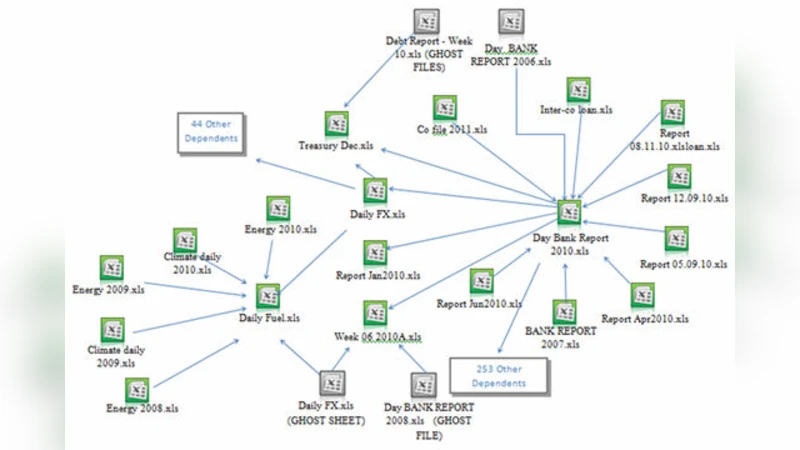
Link analysis uncovers a substantial web of inter‑workbook dependencies: 26 % of A’s workbooks and 17 % of B’s contain at least one external reference. Workbooks with external links reference on average 4,270 cells to other files; some extreme cases involve over 100 000 linked cells. Internally, 25.8 % of A’s workbooks have formulas that point to other worksheets within the same workbook, averaging 1,266 such intra‑workbook links per workbook.
These findings collectively demonstrate that the financial departments of both organisations are heavily dependent on spreadsheets to fill functional gaps left by formal ERP or accounting systems. The prevalence of basic functions, extensive VLOOKUP usage, and dense networks of external/internal links suggest a high risk of error propagation, difficulty in auditing, and significant maintenance overhead. The limited but non‑trivial presence of macros and pivot tables indicates pockets of automation, yet the overall environment remains largely manual and opaque to management.
The authors acknowledge limitations: password‑protected and pre‑1995 files were omitted, and the study does not map spreadsheet usage to specific business processes through qualitative methods. They propose future work that combines log analysis, user interviews, and process mining to better understand the purpose of each workbook, assess the cost‑benefit of replacing spreadsheet‑centric workflows with dedicated BI or database solutions, and develop governance frameworks to mitigate the identified risks.
In summary, the paper provides a data‑driven baseline of spreadsheet characteristics in real‑world financial settings, highlights critical areas of risk (excessive linking, over‑reliance on VLOOKUP, limited macro control), and sets the stage for more targeted research into spreadsheet governance, automation alternatives, and organizational policy development.
Comments & Academic Discussion
Loading comments...
Leave a Comment