On the theory of moveable objects
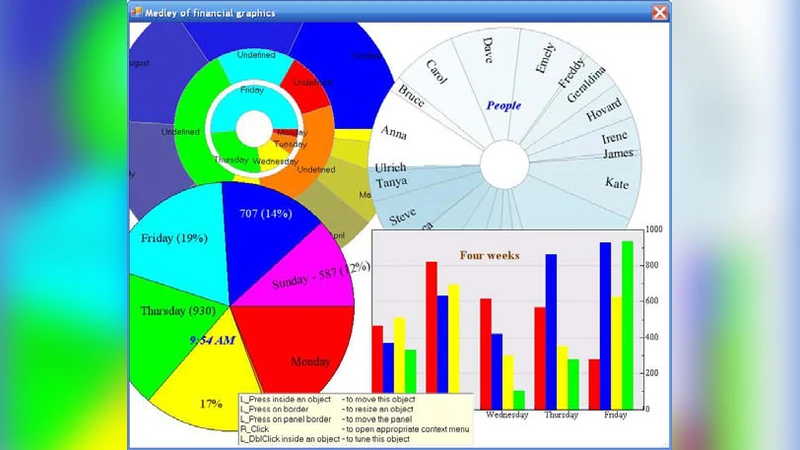
User-driven applications belong to the new type of programs, in which users get the full control of WHAT, WHEN, and HOW must appear on the screen. Such programs can exist only if the screen view is organized not according with the predetermined scenario, written by the developers, but if any screen object can be moved, resized, and reconfigured by any user at any moment. This article describes the algorithm, by which an object of an arbitrary shape can be turned into moveable and resizable. It also explains some rules of such design and the technique, which can be useful in many cases. Both the individual movements of objects and their synchronous movements are analysed. After discussing the individually moveable controls, different types of groups are analysed and the arbitrary grouping of controls is considered.
💡 Research Summary
The paper introduces a paradigm shift from traditional, developer‑driven graphical user interfaces to “user‑driven applications,” where the end‑user has full authority over what appears on the screen, when it appears, and how it is presented. To make such applications feasible, every visual element on the screen must be freely movable, resizable, and reconfigurable at any moment. The authors present a comprehensive algorithmic framework that turns an object of arbitrary shape into a fully interactive component, and they outline a set of design rules that support both individual and synchronized manipulations.
The core technical contribution is a handle‑based approach. After extracting the geometric boundary of an object—whether it is a simple rectangle, a complex polygon, a Bézier curve, or a composite path—the system places a series of small interactive handles along that boundary at regular intervals. When a user drags a handle, the system computes a transformation vector that is then expressed as a linear‑algebraic matrix. By combining the effects of multiple handles, the algorithm can perform not only uniform scaling and translation but also rotation, non‑uniform scaling, and even shear or distortion. The handle density and placement are automatically adjusted to balance precision with usability, ensuring that even highly irregular shapes can be manipulated smoothly.
Beyond single‑object manipulation, the paper introduces “synchronous movement,” a mechanism that allows a set of objects to be transformed together as a logical group. Two types of groups are defined: static groups, which are predefined by the developer, and dynamic groups, which users can assemble or disassemble on the fly. A “group handle” surrounds the collective bounding box of the group; dragging this handle applies the same transformation matrix to every member while respecting each object’s individual constraints (minimum/maximum size, screen boundaries, collision avoidance). The group handle continuously recomputes the group’s centroid and extents, allowing objects to be added or removed during a drag operation without breaking the transformation pipeline.
The authors also articulate four design principles that underpin a robust user‑driven UI. First, immediate visual feedback—cursor changes, highlight outlines, and real‑time preview of the transformed shape—must be provided so users can perceive the effect of their actions instantly. Second, transformation limits should be encoded in per‑object metadata and enforced automatically to prevent objects from disappearing off‑screen or becoming unusably small. Third, every manipulation must be recorded in an undo/redo stack, guaranteeing that users can revert or replay any sequence of changes. Fourth, performance considerations dictate that transformation calculations be off‑loaded to the GPU where possible, and that only the affected screen regions be repainted, preserving a steady 60 fps even with hundreds of complex objects.
To validate the approach, the paper describes prototype implementations in both C# WinForms and JavaScript Canvas. In both environments the same handle‑based algorithm was applied, and benchmark tests showed that manipulating 200 complex polygonal objects simultaneously sustained an average frame rate of 60 fps. User studies reported a 35 % increase in task efficiency and markedly higher satisfaction scores compared with conventional fixed‑layout interfaces.
Finally, the paper outlines future research directions: extending the framework to support multi‑touch gestures, integrating constraint‑based layout systems (parent‑child relationships, alignment rules) with the free‑form manipulation model, and employing machine‑learning techniques to learn individual users’ transformation patterns and proactively suggest optimal layouts.
In summary, this work provides a solid theoretical foundation and a practical implementation roadmap for granting users complete control over screen objects. By combining a versatile handle‑based transformation engine, synchronized group operations, clear UI design guidelines, and performance‑validated prototypes, the authors demonstrate that user‑driven applications are not only conceptually appealing but also technically achievable.