Documenting Problem-Solving Knowledge: Proposed Annotation Design Guidelines and their Application to Spreadsheet Tools
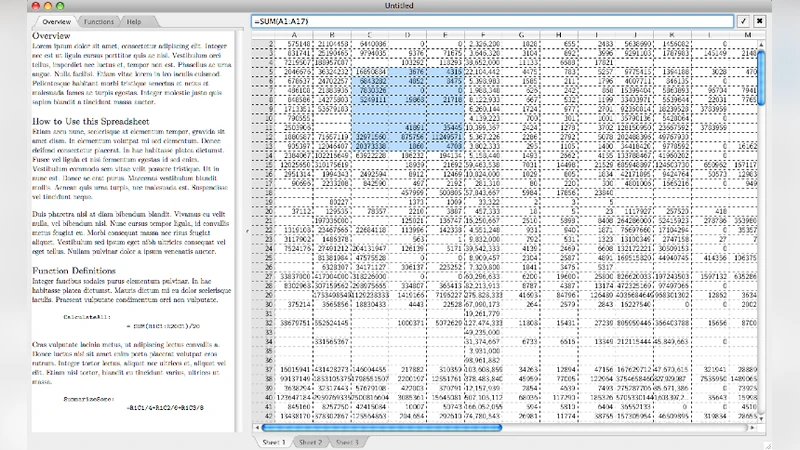
End-user programmers create software to solve problems, yet the problem-solving knowledge generated in the process often remains tacit within the software artifact. One approach to exposing this knowledge is to enable the end-user to annotate the artifact as they create and use it. A 3-level model of annotation is presented and guidelines are proposed for the design of end-user programming environments supporting the explicit and literate annotation levels. These guidelines are then applied to the spreadsheet end-user programming paradigm.
💡 Research Summary
The paper addresses a fundamental shortcoming of end‑user programming (EUP): the knowledge that users generate while solving domain problems is usually embedded implicitly in the artifact and remains invisible to others. To make this tacit knowledge explicit, the authors propose an annotation‑centric approach, focusing on spreadsheets as a representative EUP environment. They introduce a three‑level annotation model. The first level, Implicit, consists of system‑generated metadata such as cell addresses, data types, and dependency information that are always available without user effort. The second level, Explicit, requires the user to attach purposeful comments, assumptions, constraints, and rationales directly to individual cells or ranges. This level is supported by UI elements like inline editors, pop‑up dialogs, or side panels that maintain a one‑to‑one mapping between annotations and spreadsheet elements. The third level, Literate, aggregates explicit annotations into a structured, narrative document that can include headings, tables, code blocks, figures, and hyperlinks, thereby turning a collection of cell‑level notes into a cohesive report or tutorial.
From this model the authors derive ten design guidelines for EUP environments that aim to lower the barrier to annotation, keep annotations synchronized with the underlying logic, support collaborative editing, and ensure discoverability, persistence, security, and performance. Key guidelines include: (1) minimize annotation friction through auto‑completion, templates, and contextual hints; (2) bind annotations to the spreadsheet’s dependency graph so that changes in formulas automatically flag affected notes; (3) provide versioning and merge mechanisms to resolve concurrent edits; (4) standardize metadata fields to enable powerful search and reuse; (5) offer layered views that let users toggle annotation visibility; (6) implement automatic backup and history tracking; (7) embed feedback loops that suggest missing documentation or flag inconsistencies; (8) support export to multiple formats (HTML, PDF, LaTeX, etc.); (9) enforce fine‑grained access controls for sensitive annotations; and (10) allow extensibility so that domain‑specific annotation types can be added without degrading performance.
The paper then demonstrates how these guidelines can be instantiated in a modern spreadsheet system. An “Annotation Panel” is added as a persistent sidebar that appears when a cell or range is selected, displaying any associated explicit notes and offering rich‑text editing tools (lists, tables, code snippets, hyperlinks). A “Literate Viewer” reorders and formats the collected notes into a narrative document that can be previewed, printed, or exported. A dependency‑graph visualizer highlights which annotations are impacted when a formula changes, giving users immediate feedback on the ripple effect of edits. Collaboration features include per‑annotation change logs, conflict detection, and an automated merge assistant. Security is handled by allowing cell‑level read/write permissions on annotations, preventing accidental exposure of proprietary logic. Performance optimizations ensure that annotation rendering scales to large workbooks.
Empirical evaluation through case studies—primarily complex financial models and data‑analysis pipelines—shows that the annotation system dramatically improves maintainability and knowledge transfer. Users were able to locate assumptions, trace calculation provenance, and correct errors far more quickly than with unannotated spreadsheets. New team members required significantly less onboarding time because the literate reports provided a clear, high‑level overview of the model’s intent and structure. The authors conclude that systematic annotation bridges the gap between ad‑hoc end‑user programming and professional software engineering practices. They suggest future work on automatic annotation generation using machine‑learning techniques, natural‑language quality assessment of notes, and extending the model to other EUP domains such as visual programming environments and macro‑based automation tools.
Comments & Academic Discussion
Loading comments...
Leave a Comment