SimDialog: A visual game dialog editor
SimDialog is a visual editor for dialog in computer games. This paper presents the design of SimDialog, illustrating how script writers and non-programmers can easily create dialog for video games with complex branching structures and dynamic respons…
Authors: C. Owen, F. Biocca, C. Bohil
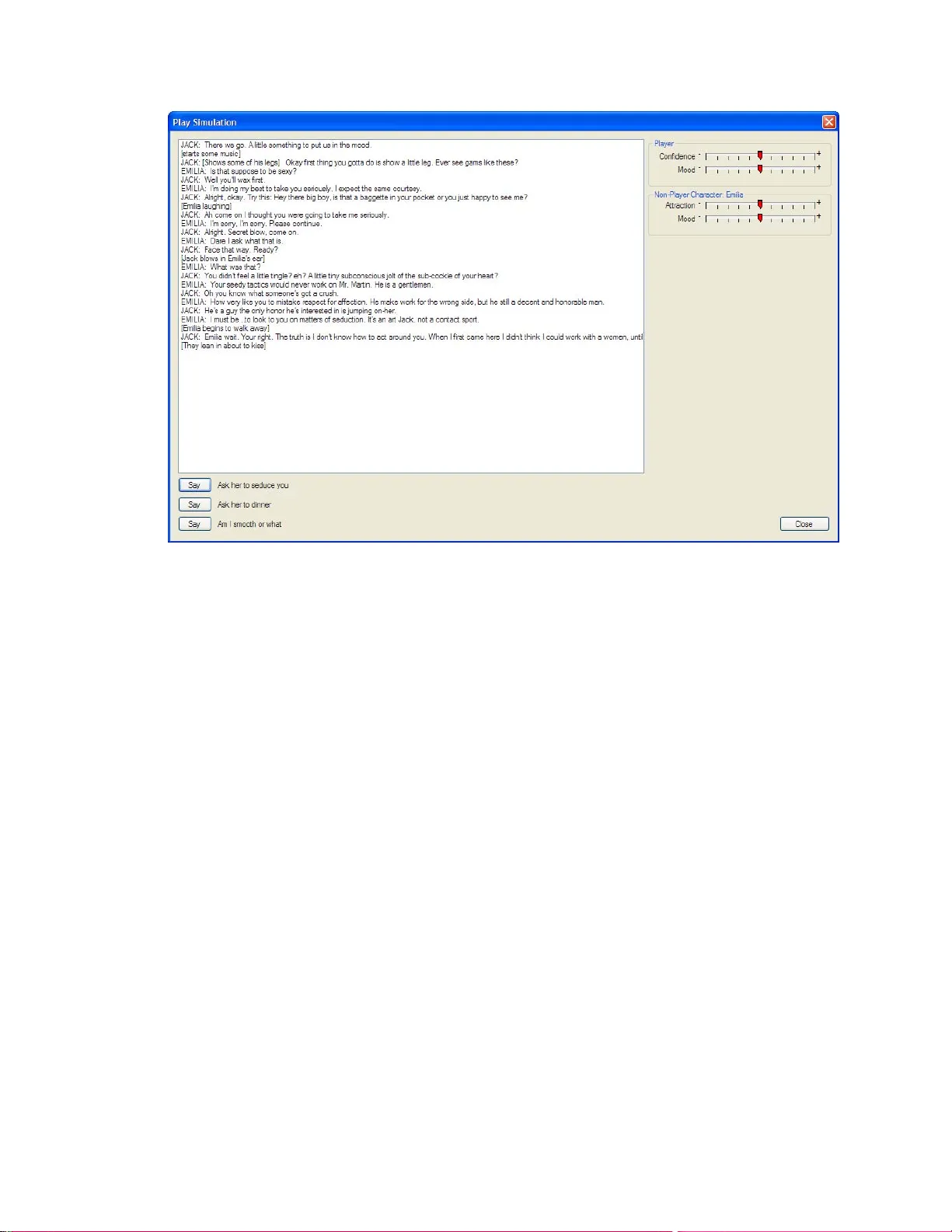
SimDialog: A Visual Game Dialog Editor 1 Running head: SIMDIALOG SIMDIALOG: A VISUAL GAME DIALOG EDITOR Charles B. Owen, Frank Biocca, Corey Bohil, Jason Conley Michigan State University East Lansing MI SimDialog: A Visual Game Dialog Editor 2 Abstract SimDialog is a visual editor for dialog in computer gam es. This paper presents the design of SimDialog, illustrating how script writers and non-programme rs can easily create dialog for video games with complex branching st ructures and dynam ic response characteristics. The system creates dialog as a directed graph. Th is allows for play using the dialog with a state- based cause and effect system th at controls selection of non-play er character responses and can provide a basic scoring mechanism for games. SimDialog: A Visual Game Dialog Editor 3 Introduction A challenge in the design of computer games is writing, organizing, and testing non- linear dialog involving multiple user options and branches to many differ ent possible character responses. One form of these are dialog trees (Batem an 2007) -- scripts that allow for multiple user inputs and character responses. We have de veloped SimDialog, a visual editor for complex non-linear game dialog. The SimDialog system consis ts of an editor program that allows authors to design complex conversations with multiple o ptions and a runtime component that manages the progression through the convers ation during game play. SimDialog makes it easy for game writers and non-programmers to create dialog for co m puter games directly without having to edit complex file formats or pass their work to prog rammers who must then embed the dialog in the game program. It also provides a consolidated way to inventory all of the assets of a gam e specifically related to dialog, including audio clips and lip-sync data files. Approaches to non-linear dialog in game design A common theme in many video games is di alog between the player and non-player characters (NPC’s). Games such as Leisure Suit Larry (Lowe 2004) and Desperate H ousewives (Games 2006) convey a story throug h the use of dialog. Dialog m ay appear as text on the screen, audio recordings of spoken dialog, or fully lip-syn ced speaking characters. As a participant in these conversations, the user impacts the sto ry as presented, changing the way the story evolves or changing small details of the story. Many game s are dialog-intensive, w ith the m ajority of the player interaction taking pl ace through dialog selection. There are several ways that players can partic ipate in dialog with a video game, the most basic are menu selections and free text entry (S zilas and Kavakli 2006). Allowing the user to type text directly into the system (or potentially speak to the system) perm its great flexibility in SimDialog: A Visual Game Dialog Editor 4 the dialog. However, this modality requires natu ral language processing and complex artificial intelligence concepts or the use of an extrem ely limited vocabulary and tolerance of co nsiderable errors in understanding (Karlgren, Bretan et al . 1995). For this reason, most games choose the alternative of presenting dialog op tions to the user in a menu, a m e thod referred to as controlled interfaces. It is this menu-based stru cture that is the subject of this pape r. The structure of a conversation then resembles a dialog graph w ith nodes representing utterances and links representing possible transitions. A com plete conversation is a path through the graph . Authoring dialog for video games is a consid erably m ore complex writing task than creating the script for a movie or television program. The proce ss of a conversat ion is nonlinear and cannot be captured as a simple script. Rather than a simple linear pr ogression of topics, the game instead seeks to convey a set of scenes, themes, or ideas. Even if the NPC has only one path in the conversation, the play er must have options from which to choose, so that the game creates the illusion of influenci ng story progression. Hence, the dialog must be described in a more complex format than a script. A common solution to this problem is the creat ion of a custom file format that supports the authoring process. The SimDialog system is a gam e component th at edits and organizes dialogue in a game. It creates an XML file th at contains all dialog fo r the game and can be loaded at runtime. SimDialog assumes player s and non-player characters (NPC). Normally, only one player would be created, but that is not limited in the system . SimDialog keeps a set of conversations that represent inte ractions between the player and each NPC. Dialog is collected into pages for editing purposes only. The structure of conversati on is a directed graph. No limits are imposed on the construction of this graph, though most games will rarely in corporate cyclic structures. SimDialog: A Visual Game Dialog Editor 5 Most game engines, such as Torque and Virtools , embed dialog in scripts, requiring a programmer to translate the autho r's work into the game engine. Dialog in video games is closely related in concept to interactive dr ama (ID), though the sim ple graphical structure common in computer games is typically deem ed too limiting for modern ID. The PastMaster system, for example, allows the creation of narratives, the equi valent of SimDialog conversations, using predicate logic (Szilas and Ka vakli 2006). Because all dialog is at the sam e level and no sample-once strategy is us ed, the number of text options in PastMaster grows rapidly, limiting the reasonabl e interaction period. SimDialog Dialog Scripting Engine SimDialog Elements SimDialog collects conversations , interactions between a pl ayer and one or more non- player characters. A conversation has a start and can have m ultiple ends. The start may be invoked when the player approaches some NPC. The end indicates the term ination of the conversation, which may be an indication that a scene has ended or the NPC wishes to converse no more. This section defines the elem ents of a SimDial og conversation. Player Character . SimDialog assumes a player will inte ract with non-player characters. Decisions about what player line is to be spoke n by the player character are made by the player via a menu on the screen. Associated with a player are attributes that descri be the pl ayer, such as the player name, gender, age, etc. SimDialog does not lim it the number of players, though the system is best suited for single-player games. Non-player Character . Non-player characters (NPCs) are the characters a player is interacting with. NPCs have attributes similar to those of the player character. SimDialog: A Visual Game Dialog Editor 6 Actor. An actor is any character who can speak. The set of actors is the union of player and non-player characters. An Actor dialog box allows for the edit ing of actors and the indication of characteristics of the actor. Conversant. A conversant is a non-player character th at the player is interacting with. What a player chooses to say impacts the convers ant, changing the conversant’s state. Normally, conversations will be among a player and a non-player character. In this ca se the conversant is obvious. However, conversations with more than two participants require som e indication of to whom player statements are directed. Page. SimDialog organizes dialog into pages that can be used to organize scenes or any segment of dialog. Multiple pages can be ope ned at once using the W i ndow/New menu option. Each page is assigned a name. Pages are only for organizational purposes , they do not restrict dialog functionality in any way. Dialog Modeling in SimDialog Dialog is organized in SimDial og in the form of graphs. A graph starts with a nam ed start node and can contain dialog items (cues), term inations, and references. The items in the graph are called nodes. There are several types of nodes. Right-clicking the mouse on the workspace opens a context menu that includes opti ons to create the availab le dialog nodes. Figure 1 is an example dialog graph. Double-clicking on a node invokes a dialog box that allows the node fields to be edited. This game dialog structure if often referred to as a dialog tree (Bateman 2007). However, this is a misnomer when it app lies to SimDialog, as a tree imp lies nodes can be reached from only one preceding node. As can be seen in Figure 1, nodes (e.g., possible conversant responses) can be reached from multiple pr eceding nodes (e.g., a user’s ques tion). A common criticism of a dialog tree structure is that it grows exponentially due to the br anching. In reality, the graph SimDialog: A Visual Game Dialog Editor 7 more commonly approximates a fe w parallel linear structures th at navigate the player through the presented scene, perhaps including early ex its due to player acti ons causing conversation terminations or even the player's demise. Figure 1 - E xample dialog g raph Dialog Item A dialog item is an element of speech that can be said; a cue. It is on e thing that the player or NPC can say and includes any ancillary me ta-data as sociated with the speech element. The colored bars in each dialog box indicate which actor is speaking the cue. The red bars in the figure represent player utterances, while the green bars represent a NPC's responses. Included with the cue is an optional direction field (not displayed in Figure 1), allowing for the inclusion of directions to the game engine. The direction fiel d is analogous to a parenthetical in script writing. Parentheticals in stageplays describe stage dir ections (e.g., character moves to SimDialog: A Visual Game Dialog Editor 8 door, for example). Either the direction or the cue can be om itted, allowing an NPC to response with shrug, a statement, or both. Associated with a dialog item are the direction field, a labe l f or the menu option, the actor and conversant, and names of associated files such as audio and lip-s ync data files. Start A start node indicates an entry point into a dialog graph. A name is associated with the start node and allows the game engine to choose an appropriate dialog at any given time. Start nodes provide the game engine a named entry point for a conversation. Termination A termination node indicates the end of a dialog graph. Termination nodes include information that tells the game that a dialog se quence is complete. Term ination nodes include a direction field that informs the game engine of the reasons for termination, so higher-level gam e logic can decide to proceed to a different conversation or scene. Reference A reference node is a link to anot her dialog graph. It is an or ganizational tool designed to simplify the production of dialog graphs and to al low for transitions among scenes. A reference node allows a longer conversati on to be broken into pages. Subdialog Nodes Although the graphical structure of SimDialog allows a completely nonlinear dialog structure, conversations in vide o games are typically broken into sections that convey a specific idea or put the player to a specific test. As an example, a conversation might consist of an initial meeting phase, a "getting comfortable phase", so m e social negotiation ph ase, and a terminal phase. The initial meeting phase exchanges plea santries such as names and basic inform ation SimDialog: A Visual Game Dialog Editor 9 sufficient to determine if the conversation pro ceed s or terminates. The "getting comf ortable phase" is the small talk that builds trust among th e participants, the nego tiation phase allows the participants to determine if the social arrang ement will con tinue beyond this conversation and the terminal phase handles the partin g. An author will typically conceive these phases independently, rather than as a complete conve rsation, particularly in a nonlinear environment such as a video game. The subdialog node allows a unit of conversation to be treated as a single element in the dialog graph. The preceding example would be m odeled as four subdialog nodes, each referring to a conversation on another page. The conversati on proceeds from start to term ination, and then continues to the next subdialog node. Termin ation nodes for a subdialog include a termination value, so that the subdialog node can be fo llowed by multiple options, allowing the negotiation phase, for example, to proceed to a future date or to a slap in the f ace and immediate parting. Cause and Effect: How conversant states affect branching through the dialog trees A player will manually select from the multip le possible dialo g options at any point in game play. However, the NPC selection must be m ade automatically. A greeting may be followed by a positive or negative response, de pending on the “mood” of the NPC. SimDialog models this decision process through the use of states, causes, and effects. States are variables associates with actors that re present arbitrarily defined quantiti es such as mood, health, game score, etc. Causes determine how a specific st ate will be used to choose an NPC response. Effects are the impact upon the specific state that chosen responses illicit. The states dialog box allows for the definition of states for the character and for non- player characters. States control the selection (i .e., probability) of which link will be used for an NPC (i.e., what the NPC will say or do). Player states are associa ted with the player. NPC states are associated with each NPC. There is one set of player states for the gam e and one set of NPC SimDialog: A Visual Game Dialog Editor 10 states for each NPC. States are numbers that ran ge from -1 to 1. They will be disp layed in the simulator (describ ed below). States are arbitrarily defined by the author and are specific to a game. Exam ple player states include “health” and “confidence.” Actio ns a player takes m ay increase or decrease health. Responses from an NPC may increase or decrease confidence. For example, an NPC saying “You look very nice tonight” might incr ease confidence; while a different NPC saying “You have no taste in clothes” might decrease confidence. Exam ple NPC states include “attraction” and “mood.” Attrac tion might indicate the NPC’s attraction to the player’s character. Positive valu es indicate the NPC fi nds the player attractive, while negativ e values indicate the NPC finds the player repulsive. The attraction an NP C has to the player’s character may vary depending on what the player chooses to say. States associated with an NPC may indicate states of the NPC or states of the character. As an example, an NPC may have two attraction states -- one indicating th e NPC’s attraction to the player, the other indicating the player’s attraction to the NPC. SimDialog allows an arbitrary number of states to be define d for the NPC and the player. State names are also arbitrary and determined entirely by the author. Cause is associated with NPC dialog item a nd end nodes. The selection of a player dialog element is performed by the player from a m enu, so cause is not applicable and is deactivated in the item dialog box. Cause is also not applicab le to start nodes, since they are explicitly selected by the game engine to indicate a conversation start. Effect is associated with start and dialog item nodes. Sele ction of any dialog item causes an effect, be it selection by the player through a menu or by the system due to cau se. The effect associated with the start node allows an initial state to be defined. SimDialog: A Visual Game Dialog Editor 11 Cause A cause is how states will be evaluated in the process of choosing which dialog item to speak. Causes are only used for NPCs. There is a "General" cause wei ght and a cause weight for each player and NPC state. Weights range from -1 to 1 and are indicated in the user in terface by a slider control. Figure 2 is an illustration of the dialog item dialog box. Cause weights are on the left. Figure 2 - Di alog item dial og box (see tex t for details) After a player has selected a dialog item fr om the available choices , the weights for all following NPC dialog items are computed. The wei ght is the sum of the general weight and the products of the current states and their asso ciated weights (see Equation 1 below). A positive weight indicates a given state will ha ve a direct impact on the to tal weight. A negative weight indicates a given state will hav e an inverse impact on the total weigh t. For example, a positive weight f or player confidence will indica te increased player confidence and increases the likelihood a given dial og item is selected. This m ay be a dialog item that would be SimDialog: A Visual Game Dialog Editor 12 said to a player who is demonstrating confid ence. A negative weight for confidence would indicate a dialog item that favors lack of conf idence. Zero w eights indicate a given state is ignored in the selection process. A cause weight is in the range [-1, 1]. The dialog item has an associated set of cause weights , where the scalar w g is the general cause, w p is a vector of cause weights associated with player states and w n is a vector of cause weights associated with th e non-player character. Let s p be the vector of player states and s n the vector of non-player states for the current conversant. The score s for a dialog item is computed as the sum of the general cause weight and the inner products of the weights and the scores for the player and conversant: n n p p g s w s w w s ⋅ + ⋅ + = 1 ) The impact of any state can be nullified by simply setting the associated weight to zero. The average cause value indicates if the node response is positively or ne gatively impacted by the set of states. SimDialog uses th is average to com pute th e background color of a node in the user interfac e. White is an indicator of neutra l cause, shades of green represent positive causes and shades of red negative causes. As an example, the response to "How are you doing" might be "Very well, thank you" or "Get lost, creep" depending on the NPC mood state. A positive cause for mood will cause the form er response (increasing mood increases the score), while a negative cause will illic it the latter (decreasing m ood d ecreases the score). In the interface, these two options appear as green and red respectively. Effect An effect is how states will be changed f o llowing execution of a dialog item. A positive value increases the state. A negative value decr eases it. Weights are bounded to range between - SimDialog: A Visual Game Dialog Editor 13 1 to 1. As an example, a positive eff ect weight for player happiness would indicate that th is dialog item has increased the player's happiness. An effect weight is a number in the range [-1, 1]. Let e p be the vector of effect weights associated with the player states and e n the vector of effect weight s associated with the NPC. The new state is the sum of the current state vect or and the effect vector bound in the range [-1, 1]: ))) ( , 1 min( , 1 max( i i i e s s + − = 2 ) Inventory Generation Game Simulator Right clicking on any dialog node brings up a context menu for the node. An option in that menu is "Play". The play menu option invoke s the gam e simulator. This dialog box allows the conversation, starting at the se lected node, to be played in a dialog-only mode. This gives authors the ability to test the game play immedi ately without importing the result into the final game engine. During simulation, all state variable s for the player and conversant are displayed and can be manually manipulat ed. Figure 1illustrates th e game simulator. SimDialog: A Visual Game Dialog Editor 14 Figure 3 - Game simulator Script Importing Writing non-linear dialog can be quite comple x. Typically, a writer’s initial draft of game dialog might be in the form of a linear script. Au thors create this form first to develop the general story line and flow of events. In subseque nt drafts different dialog paths are elaborated and appended. In traditional game development, th is document is then annotated by th e author to indicate branching and player op tions and then sent to programme rs who subsequently transcribe the script into the form nece ssary for the game engine. SimDialog allows authors to create s cripts in a fam iliar form, and then im port them into the system. The importer reads a co mmon script format, with actor-labeled lines and any parenthetical enclosed in brackets. An initial game graph is created from the imported script. An example script and the imported graph are illustra ted in Figure 4. Jack: There we go. A little something to pu t us in the mood. SimDialog: A Visual Game Dialog Editor 15 [starts some music] Jack: [Shows some of his legs] Okay first thing you gotta do is show a little leg . Ever see gams like these? Emilia: Is that supposed to be sexy? Jack: Well you'll wax first. Emilia: I'm doing my best to take you seriously , I expect the same courtesy. (Blake 2000) Figure 4 - Example script an d imported representation This feature then allows the writer to begin to more easily elaborate, draw, and visualize different non-linear paths through the conversation. The cause a nd effect components of small talk allow the design team to define how each interaction affects player and NPC states. Conclusion SimDialog is currently under development for a series of health communication games involving substantial interpersonal interaction. This draft presents the stat e of the system and the current design goals. The final submission of this paper will contain (1) additiona l narrative that discusses the writer experiences with the syst em, (2) integration w ith the Virtools ga me development system, and (3) dem onstrations of the SimDialog dialog engine and simulator. SimDialog: A Visual Game Dialog Editor 16 SimDialog is being created to solve a probl em that is common in gam e development: how to enter large quantities of non- linear dialog so as to convey a story in convers ations without requiring the direct participati on of programmers. As computer gam es become more widely accepted as tools for teaching and behavior influe nce, game developm ent must become easier. Tools such as SimDialog and the experience gained in the program’s development can help to drive development of tools that can h elp in that process. SimDialog: A Visual Game Dialog Editor 17 Acknowledgements This work was supported by grant #P01 CD000237 from the Centers for Disease Control. SimDialog: A Visual Game Dialog Editor 18 References Bateman, C. (2007). Dialog egines. Game writing: Narrative skills for video gam es . C. Bateman. Boston, Charles River Publishing. Blake, M. (2000). Sex and the Single Spy. Jack of All Trades . Games, B. V. (2006). Desparate Housewives: The Game (video game). Karlgren, J., I. Bretan, et al. (1995). Interaction Models, Referen ce, and Interactivity in Speech Interfaces to Virtual Environments. Proceedings o f Eurographics'95 . Lowe, A. (2004). "Leisure Suit Larry : Magna Cum Laude (video game)." Szilas, N. and M. Kavakli (2006). PastMaster@sto rytelling: a contro lled in terface for interactive drama Proceedings of the 11th in ternational conf erence on Intelligen t user interfaces Sydney, Australia
Original Paper
Loading high-quality paper...
Comments & Academic Discussion
Loading comments...
Leave a Comment